
Browser Extensions Gone Rogue: The Full Scope of the GhostPoster Campaign

Last month, researchers at Koi Security published a detailed analysis of a malicious Firefox extension they dubbed GhostPoster - a browser-based malware leveraging an uncommon and stealthy payload delivery method: steganography within a PNG icon file. This innovative approach allowed the malware to evade traditional extension security reviews and static analysis tools.
Following their publication, our investigation identified 17 additional extensions associated with the same infrastructure and tactics, techniques, and procedures (TTPs). Collectively, these extensions were downloaded over 840,000 times, with some remaining active in the wild for up to five years.
Technical Overview: Multi-Stage Evasion and Payload Delivery
The GhostPoster malware employs a multi-stage infection chain designed for stealth and persistence:
- Payload Encoding: The initial loader is embedded within the binary data of an extension’s PNG icon.
- Runtime Extraction: Upon installation, the extension parses the icon to extract the hidden data, a behavior that deviates from typical extension logic.
- Delayed Activation: The malware delays execution by 48 hours or more, and only initiates C2 communication under specific conditions.
- Payload Retrieval: The extracted loader contacts a remote C2 server to download additional JavaScript-based payloads.
Post-activation, the malware is capable of:
- Stripping and injecting HTTP headers to weaken web security policies (e.g., CSP, HSTS).
- Hijacking affiliate traffic for monetization.
- Injecting iframes and scripts for click fraud and user tracking.
- Programmatic CAPTCHA solving and injection of additional malicious scripts for extended control.
These features indicate the campaign is not only financially motivated but also technically mature, emphasizing operational stealth and longevity.
Infrastructure and Threat Attribution
The infrastructure uncovered by Koi Security was linked to 17 Firefox extensions, all sharing similar obfuscation patterns, C2 behavior, and delayed execution strategies. Our automated Extension malware lab feature confirmed the same threat actor infrastructure was also used to distribute extensions on the Google Chrome and Microsoft Edge Add-ons Store. Our analysis shows the campaign originated on the Microsoft Edge browser, with later expansion to Firefox and Chrome.

Figure 1. GhostPoster Upload to Browser Extension Stores
Key findings:
- 17 confirmed extensions, with infrastructure overlap and common loader patterns.
- Over an additional 840,000 cumulative installs across Firefox, Chrome and Edge browsers.
- Malicious presence dating back to 2020, indicating long-term operational success, bypassing all major browsers stores’ security checks .
- Variants using alternate delivery mechanisms, suggesting ongoing experimentation and adaptation.
Extended Variant Analysis: Background Script–Based Payload Staging
Beyond the previously identified extensions, we observed a more sophisticated and evasive variant associated with the same campaign, which alone accounted for 3,822 installs.
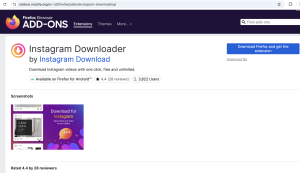
Figure 2. Firefox Extension Available for Download in Store.
In this iteration, the malicious logic is embedded within the background script and leverages an image file bundled inside the extension as a covert payload container. At runtime, the background script fetches the image and scans its raw byte sequence for the delimiter [62,62,62,62] - corresponding to the ASCII string ‘>>>>’. All data following this marker is decoded as text and stored persistently in chrome.storage.local under the key instlogo.

Figure 3. Reading .png Content, Decoding and Saving in Local Storage.
The stored data is later retrieved, Base64-decoded, and dynamically executed as an additional JavaScript payload.
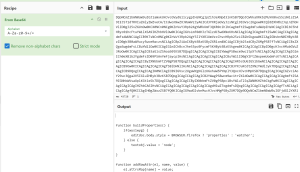
Figure 4. Decoded .png Payload.
This secondary script introduces further evasion by sleeping for approximately five days before initiating network activity. Upon activation, it fetches content from a remote server, extracts server-supplied data stored as Base64-encoded keys, and executes the decoded content, enabling ongoing payload updates and extended control.
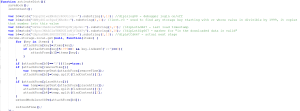
Figure 5. Png Payload - Reading from Local Storage and Decoding the Next Stage.
This staged execution flow demonstrates a clear evolution toward longer dormancy, modularity, and resilience against both static and behavioral detection mechanisms.
Post-Takedown Persistence
While Mozilla and Microsoft have removed the known malicious extensions from their respective stores, extensions already installed on user systems remain active unless explicitly removed by the user. This persistence underscores the limitations of store takedowns as a containment strategy, particularly for malware employing delayed activation and modular payload delivery.
IOCs
| ID | Name | Installs |
| maiackahflfnegibhinjhpbgeoldeklb |
Page Screenshot Clipper |
86 |
| kjkhljbbodkfgbfnhjfdchkjacdhmeaf |
Full Page Screenshot |
2,000 |
| ielbkcjohpgmjhoiadncabphkglejgih |
Convert Everything |
17,171 |
| obocpangfamkffjllmcfnieeoacoheda |
Translate Selected Text with Google |
159,645 |
| dhnibdhcanplpdkcljgmfhbipehkgdkk |
Youtube Download |
11,458 |
| gmciomcaholgmklbfangdjkneihfkddd |
RSS Feed |
2,781 |
| fbobegkkdmmcnmoplkgdmfhdlkjfelnb |
Ads Block Ultimate |
48,078 |
| onlofoccaenllpjmalbnilfacjmcfhfk |
AdBlocker |
10,155 |
| bmmchpeggdipgcobjbkcjiifgjdaodng |
Color Enhancer |
712 |
| knoibjinlbaolannjalfdjiloaadnknj |
Floating Player - PiP Mode |
40,824 |
| jihipmfmicjjpbpmoceapfjmigmemfam |
One Key Translate |
10,785 |
| ajbkmeegjnmaggkhmibgckapjkohajim |
Cool Cursor |
2,254 |
| fcoongackakfdmiincikmjgkedcgjkdp |
Google Translate in Right Click |
522,398 |
| fmchencccolmmgjmaahfhpglemdcjfll |
Translate Selected Text with Right Click |
283 |
| amazon-price-history |
Amazon Price History |
1,197 |
save-image-to-pinterest |
Save Image to Pinterest on Right Click |
6,517 |
instagram-downloading |
Instagram Downloader |
3,807 |
TTPs
| Tactic | Technique |
| Defense Evasion | LX7.011 (T1036) - Masquerading |
| Defense Evasion | LX7.003 (T1140) - Code Obfuscation/Deobfuscation |
| Defense Evasion | LX7.004 (T1678) - Delay Execution |
| Defense Evasion | LX7.005 - Evade server-side checks |
| Discovery | LX9.005 (T1217) - Browser Information Discovery |
Recommendations
Security professionals, enterprise defenders, and browser developers should take the following actions:
- Audit extensions within managed environments, especially those installed outside of policy controls.
- Deploy behavior-based extension monitoring technologies to detect unauthorized network activity or suspicious DOM manipulation.