Unmanaged browser extensions are a leading cause of data exfiltration, yet traditional browser security solutions often fail to detect them. As employees increasingly rely on BYOD and SaaS, security teams need dedicated tools to govern this “browser-to-cloud” attack surface. Here are the top platforms for 2026.
What Are Extension Security Tools and Why They Matter
Extension security tools are specialized platforms designed to discover, risk-score, and govern browser add-ons across an enterprise. Unlike standard web filters that block domains, these solutions analyze the code and behavior of extensions themselves, detecting if a “productivity” tool is secretly harvesting CRM data or redirecting traffic. This visibility is essential for modern data protection standards.
For security leaders, these tools close a critical gap in the security stack. They prevent users from installing malicious extensions that can hijack sessions, steal credentials, or leak proprietary code to external GenAI models. By enforcing policy at the browser layer, organizations can block high-risk extensions while allowing safe, business-critical tools to run without friction.
Key Extension Security Trends to Watch in 2026
“Sleeper Agent” Extensions
Attackers are shifting to “sleeper” tactics, publishing legitimate extensions to build a user base, then pushing a malicious update months later to harvest data. Security tools are responding with continuous behavioral monitoring rather than one-time static scans to catch these delayed payloads.
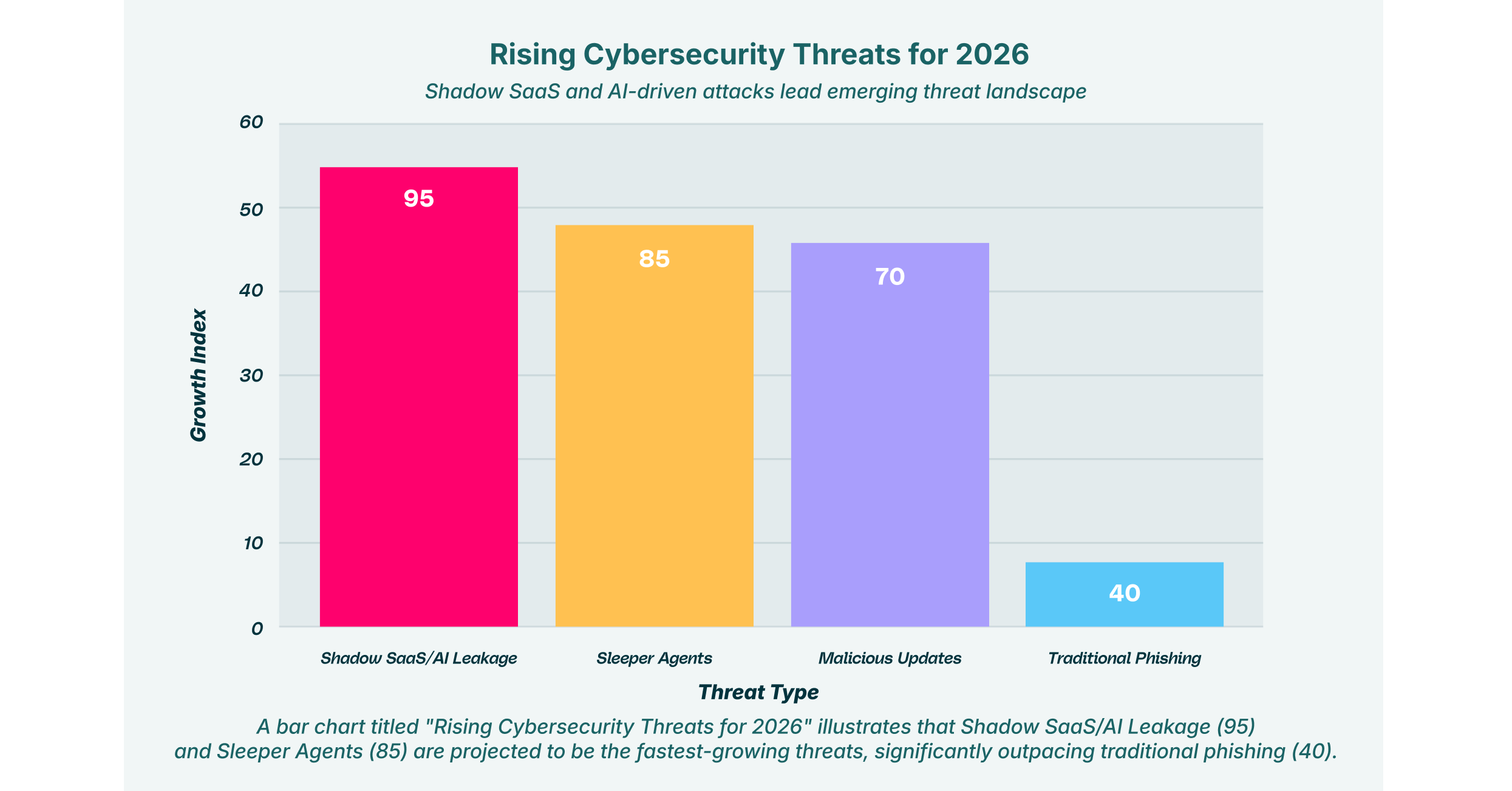
Extensions are now the primary driver of “Shadow SaaS,” where users grant broad permissions to unvetted AI tools. The market is moving toward solutions that can specifically detect when an extension is feeding corporate data into public LLMs or unmanaged cloud storage.
Agentless and Hybrid Deployment
With the hybrid workforce cementing itself, heavy agents are becoming obsolete. The trend for 2026 is toward lightweight or agentless solutions that can secure browser extensions on personal devices (BYOD) without requiring intrusive mobile device management (MDM) profiles.
Automated Risk Scoring
Manual whitelisting is no longer scalable for IT teams. Leading tools are adopting automated risk scoring engines that analyze extension code, developer reputation, and permission requests in real-time to make instant blocking or approval decisions.
8 Best Browser Security Solutions for Extensions in 2026
The market for extension security has matured, offering options ranging from dedicated analysis engines to comprehensive enterprise browser platforms.
| Solution | Key Capabilities | Best for |
| LayerX | Real-time behavioral monitoring, shadow SaaS discovery, and granular extension policy. | Unified browser security & deep visibility. |
| Spin.AI | Automated risk assessments, ransomware protection for SaaS data. | Automated risk scoring & SaaS focus. |
| Koi Security | Behavioral analysis of extension code, detection of data exfiltration. | Detecting “sleeper” & malicious add-ons. |
| SquareX | Disposable browser tabs, file isolation, and malicious URL blocking. | Safe browsing for high-risk users. |
| Seraphic | Exploit prevention via JavaScript virtualization, anti-phishing controls. | Preventing zero-day browser exploits. |
| Conceal | AI-driven decision engine, isolation of risky tabs and links. | Lightweight isolation & decision making. |
| Menlo Security | Remote Browser Isolation (RBI), cloud-based execution. | Isolating all web content from endpoints. |
| Ermes | AI-based phishing detection, behavioral analysis, lightweight agent. | Phishing protection & anomaly detection. |
1. LayerX


LayerX is a user-first browser security platform that turns any browser into a secure, managed workspace. It provides deep visibility into all browser activity, including the installation and behavior of extensions, without impacting user experience. The platform uses a lightweight agent to monitor session activity, allowing it to detect and block malicious extensions in real-time before they can exfiltrate data or compromise credentials.
Beyond simple blocking, LayerX excels at governing the data flow between the browser and SaaS applications. It can identify “shadow SaaS” apps being accessed through extensions and enforce granular policies, such as preventing an extension from reading data on specific banking or CRM sites, while still allowing it to function elsewhere. This approach secures the browser-to-cloud attack surface without forcing users to switch to a restricted custom browser.
2. Spin.AI


Spin.AI focuses heavily on protecting SaaS data and reducing the attack surface from third-party apps and extensions. Its platform is well-regarded for its automated risk scoring system, which evaluates extensions based on their permissions, developer reputation, and code analysis. This allows IT teams to set up automated policies that instantly revoke access for any extension that falls below a certain security threshold, significantly reducing manual review time.
In addition to extension management, Spin.AI provides robust ransomware protection for SaaS environments like Google Workspace and Microsoft 365. It provides visibility into OAuth permissions granted to third-party apps, ensuring that users haven’t inadvertently authorized an extension to download or modify corporate files. This makes it a strong choice for organizations looking to secure their entire SaaS ecosystem from a single dashboard.
3. Koi Security


Koi Security specializes in the deep behavioral analysis of browser extensions to detect hidden threats that standard filters miss. The platform is designed to uncover “sleeper” extensions, legitimate-looking add-ons that later update with malicious code. By analyzing the actual network activity and code execution of extensions, Koi can identify when an extension begins exfiltrating data to unauthorized domains or tracking user behavior across sites.
This solution is particularly effective for organizations concerned with privacy and surveillance. Koi provides detailed insights into what data an extension is collecting and where it is sending it, helping security teams identify spyware masquerading as helpful tools. Its focus on the extension threat vector makes it a valuable add-on for enterprises that need specialized detection capabilities alongside their existing endpoint protection.
4. SquareX


SquareX offers a unique, consumer-friendly approach to browser security that empowers users to act as their own first line of defense. Its core feature is the ability to open links and files in disposable, isolated browser tabs that run in the cloud. This means that even if an extension or website attempts to execute malicious code, it is contained within a temporary environment that is destroyed as soon as the tab is closed, keeping the user’s local machine safe.
The platform includes features like a “fearless” browsing mode and isolated file viewers, which are ideal for researchers or employees who frequently need to access high-risk content. SquareX also provides malicious URL blocking and email scanning to prevent users from falling victim to phishing attacks distributed via browser extensions. Its lightweight, non-intrusive design makes it easy to deploy to a broad user base without disrupting daily workflows.
5. Seraphic Security


Seraphic Security takes a preventative approach to browser security by virtualizing the browser’s JavaScript engine. This technology creates an abstraction layer that stops exploits and malicious scripts from executing directly on the endpoint. For extension security, this means that even if a vulnerable or malicious extension is installed, its ability to exploit the browser or scrape sensitive data from the DOM is neutralized.
The platform also offers strong anti-phishing controls and protection against clickjacking and cross-site scripting (XSS). Seraphic allows administrators to enforce granular controls over what capabilities an extension can access, effectively “wrapping” extensions in a security policy that prevents them from going rogue. This makes it a strong contender for preventing zero-day attacks that exploit browser vulnerabilities.
6. Conceal


ConcealBrowse utilizes an AI-powered decision engine to dynamically assess the risk of every URL and extension action in real-time. When a user encounters a potentially unsafe site or extension request, Conceal automatically routes that activity to a remote isolation environment. This ensures that risky content is kept away from the device while safe traffic is allowed to process locally, preserving performance and user experience.
The solution is designed to be lightweight and easy to deploy, making it suitable for protecting unmanaged devices and contractors. Conceal’s decision engine helps reduce the noise for security operations centers by handling low-level threats automatically. Its focus on credential theft protection also prevents extensions from capturing user inputs on known phishing sites, adding an extra layer of defense against identity-based attacks.
7. Menlo Security


Menlo Security is a pioneer in Remote Browser Isolation (RBI), a technology that executes all web content in a cloud-based container before streaming it to the user’s device. This approach effectively neutralizes the threat of malicious extensions by ensuring that no active code, good or bad, ever reaches the local endpoint. Users interact with a safe visual stream of their browsing session, while malware is contained in the cloud.
While highly effective at preventing infections, Menlo’s platform also provides detailed logging and control over file transfers. It protects against ransomware and data loss by inspecting uploads and downloads, ensuring that extensions cannot be used to exfiltrate sensitive files. This comprehensive isolation model is often favored by highly regulated industries that require a zero-trust approach to web access.
8. Ermes


Ermes Browser Security leverages artificial intelligence to detect and block anomalies in browser behavior. Operating as a lightweight agent within the browser, it analyzes page structures and extension activities in real-time to identify zero-day phishing attempts and social engineering attacks. Its behavioral analysis engine is capable of spotting when an extension is acting outside of its normal parameters, such as suddenly requesting access to sensitive banking portals.
The platform emphasizes ease of management and automated protection, automatically blocking malicious domains and trackers without requiring constant manual updates. Ermes provides centralized visibility into browser security events, helping IT teams identify trends and potential compromises across the workforce. Its focus on lightweight, AI-driven detection makes it a scalable option for large enterprises.
How to Choose the Best Extension Security Provider
- Visibility vs. Blocking: Determine if your primary need is simple blocking of known bad extensions (filtering) or deep behavioral visibility to catch “sleeper” threats that bypass static lists.
- Deployment Friction: Evaluate how easily the enterprise browser solutions can be deployed. Agentless or lightweight extension-based tools are often superior for supporting BYOD and contractor devices compared to heavy agents.
- Shadow SaaS Coverage: Look for secure browser tools that also provide visibility into “Shadow SaaS,” enabling you to see which cloud applications are being accessed and data-mined by installed extensions.
- Performance Impact: Consider the latency introduced by the solution. Heavy isolation tools can sometimes slow down browsing, so test for performance to ensure user acceptance.
- Policy Granularity: Ensure the provider offers granular policy controls, allowing you to restrict specific extension permissions (e.g., block “read data on all sites”) rather than just allowing or denying the extension entirely.
FAQs
Why are browser extensions a major security risk in 2026?
Extensions operate with high-level privileges within the browser, often having the ability to read and modify data on every website a user visits. Attackers exploit this access to steal credentials, capture session tokens, or exfiltrate sensitive corporate data to external servers, all while bypassing traditional network firewalls and endpoint security tools.
How do extension security platforms differ from traditional antivirus software?
Traditional antivirus software scans files on the hard drive, but malicious extensions run entirely within the browser’s memory and cloud context. Dedicated browser security tools sit inside the browser, or the web traffic stream, to monitor live behavior, API calls, and data flows that traditional AV tools are unable to see or analyze.
Can we secure extensions on unmanaged (BYOD) devices?
Yes, many modern browser security solutions utilize lightweight extensions that can be deployed specifically to a user’s corporate profile within their personal browser. This allows security teams to enforce policies and monitor threats only during work-related activities, without invading the user’s personal privacy or requiring full device management.
What is the difference between “blocking” and “risk scoring” extensions?
Blocking typically relies on a static blacklist of known bad extensions, which is reactive and often misses new threats. Risk scoring uses automated analysis of an extension’s permissions, code, and developer reputation to assign a risk level (e.g., High, Medium, Low), empowering administrators to make proactive, data-driven policy decisions before a breach occurs.
Do these tools work with standard browsers like Chrome and Edge?
Yes, the majority of leading best browser security tools are architected to integrate natively with standard Chromium-based browsers such as Google Chrome, Microsoft Edge, and Brave. They typically deploy as a management extension or integrate via the browser’s built-in management APIs, avoiding the need for a custom browser.