There’s a good chance that right now, as you read this, you have somewhere between three and fifteen browser extensions installed. A grammar checker. A password manager. Maybe a couple of AI assistants. You installed most of them quickly, clicked “Add to Chrome,” and never thought about them again.
That’s exactly the problem.
We just published our Enterprise Browser Extension Security Report 2026, and the data we collected from over one million enterprise devices tells a story that most security teams — and most employees — haven’t fully reckoned with yet. Browser extensions are everywhere, they’re powerful, and they’re largely invisible to the people responsible for keeping organizations safe.
Everyone Has Extensions. Almost No One Is Watching Them.
Let’s start with the sheer scale. 99% of enterprise users have at least one browser extension installed. Not most users. Not the tech-savvy ones. Virtually everyone. And more than one in four employees at small-to-medium organizations have over 10 extensions running in their browser at any given time.

That’s an enormous attack surface — and it’s one that most organizations have essentially zero visibility into. We consistently find that security teams can’t tell you which extensions are running across their environment, who installed them, or what those extensions are actually allowed to do. Extensions fly under the radar in a way that almost no other software does.
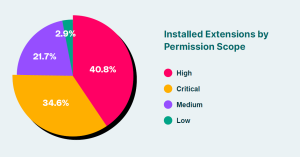
To make matters more concrete: nearly 75% of all browser extensions request high or critical permission levels — meaning they have broad access to the data flowing through your browser. Only 3% operate with low permissions. These aren’t inert little tools sitting quietly in your toolbar. They can read what you type, access your cookies and session tokens, inject code into web pages, and manage your tabs (even without the user’s knowledge).
AI Extensions: The Threat Nobody Is Talking About
Here’s where things get particularly interesting — and concerning.
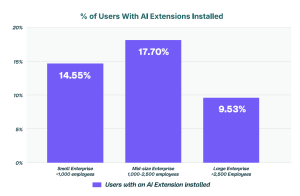
The explosion of AI tools over the past few years has quietly spawned a new category of browser extension: AI extensions. Copilots, writing assistants, summarizers, meeting helpers, auto-completers. 1 in 6 enterprise users already has at least one AI extension installed, and adoption is accelerating.
On the surface, these tools seem harmless — even helpful. But our data reveals something important: AI extensions carry a significantly more dangerous risk profile than browser extensions on average. This isn’t a marginal difference. The gap is striking:
- 60% more likely to have a known vulnerability (CVE) than the average extension — 16.3% of AI extensions have a known CVE, compared to 10.8% across all extensions
- 3x more likely to have access to your cookies — which means access to your session tokens and authentication data
- 2.5x more likely to have scripting permissions — the ability to inject code directly into web pages, capture what you type, and manipulate content
- 2x more likely to be able to manage your browser tabs — opening, redirecting, or monitoring everything you’re doing
Put those together, and you have a category of tools that employees are adopting quickly, enthusiastically, and with very little scrutiny — that happen to be requesting the most powerful permissions available.
They Change Over Time. Silently.
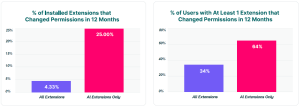
One of the findings that surprised even us: AI extensions are nearly 6x more likely to change or expand their permissions after installation compared to the average extension.
Think about what that means in practice. You install an AI writing assistant. It asks for reasonable access. You approve it. Six months later, it quietly updates and now has access to your cookies, your tabs, your browsing history. You never saw a prompt. You never approved anything new. It just… changed.
Our data shows that 64% of users have at least one AI extension that changed its permissions in the past 12 months, compared to 34% of users across all extensions. This isn’t a one-time installation risk — it’s a continuously evolving one.
Trust Signals Are Weak Across the Board
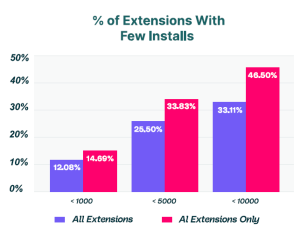
The picture gets even murkier when you look at the reputation signals of the extensions people are running. Almost half of all AI extensions have fewer than 10,000 users — meaning there’s very little community vetting, very little public track record, and very little accountability if something goes wrong.
And over 71% of all extensions — AI or otherwise — don’t even have a privacy policy. More than 73% of enterprise users have at least one extension installed that provides no transparency whatsoever into how it handles their data.
What To Do About It
The first step is simply to know what you have. A full inventory of every extension running across every browser, every device, and every user isn’t a nice-to-have — it’s the baseline. You can’t manage risk you can’t see.
From there, AI extensions deserve their own dedicated scrutiny. Given their elevated permissions, their faster rate of change, and their direct access to sensitive in-browser data, they shouldn’t be treated the same as a simple spell-checker.
We put all of this together — the full data, the breakdowns by organization size, the permission comparisons, and the specific recommendations — in our Enterprise Browser Extension Security Report 2026.