
Why The Browser Has Become the Enterprise’s Most Overlooked Endpoint

Most enterprise work now happens in the browser. Employees launch SaaS apps, invoke GenAI tools, paste in prompts, install extensions and authenticate identities, all happen in the browser. And yet, despite being the centerpiece of modern productivity, the browser remains largely outside the visibility of traditional security stacks like DLP, EDR, and SSE.
That blind spot is where data leakage, credential theft, and AI-enabled risks now converge and where many of today’s most sophisticated breaches begin. The Browser Security Report 2025 examines this shift through both quantitative telemetry and real-world security incidents, revealing how modern attacks now exploit browser sessions, extensions, identities and GenAI interactions that legacy tools were never built to protect.
AI has become the Fastest-Growing and Least-Governed Data Channel
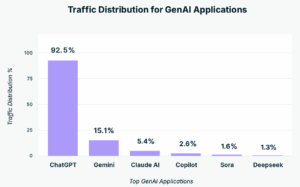
Nearly half of all employees now use generative AI tools, with ChatGPT commanding 92% of all activity. 77% users paste data into prompts, 82% use personal accounts, and 40% of uploaded files contain PII/PCI. With GenAI now accounting for 32% of all corporate to personal data movement, it has become the #1 exfiltration channel in the browser.
This isn’t just another SaaS category; it’s the fastest-growing business tool and the least governed by a wide margin. Traditional governance built for email, file-sharing, and sanctioned SaaS didn’t anticipate that copy/paste into a browser prompt would become the dominant leak vector.
The Rise of AI Browsers: The Next Invisible Risk Surface
A new wave of AI browsers like Perplexity, Arc Search, Brave AI, OpenAI Atlas, and Edge Copilot, is changing how employees work online. These tools don’t just open pages; they read, summarize, and reason over them, blending browsing and prompting into one experience.
But this intelligence comes with risk. AI browsers access sensitive corporate content through session data, cookies, and SaaS tabs to personalize results. Every tab, copy/paste, and login could quietly feed external AI models, creating what we call an “invisible AI endpoint.”
Unlike traditional browsers, these AI-driven ones operate outside enterprise visibility and DLP controls, turning session memory, auto-prompting, and cookie sharing into new exfiltration paths. And because employees adopt them alongside Chrome or Edge, most security tools never see them.
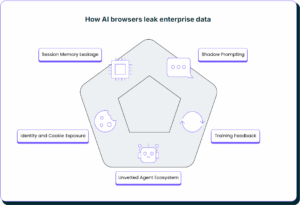
For security leaders, AI browser governance is now as critical as AI app control. Enterprises must extend browser-native visibility and DLP into these AI-powered environments where data, identity, and automation silently converge.
Browser Extensions Are the Enterprise’s Largest Invisible Supply Chain Risk
If you think browser extensions are just innocuous add-ons, think again. 99% of enterprise users have at least one extension installed, with more than half having high or critical permissions. Yet 54% of publishers use free Gmail accounts, and 26% of extensions are sideloaded.
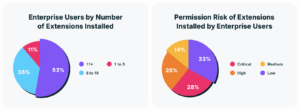
In effect, the browser’s extension ecosystem has become an unmanaged software supply chain embedded inside every user. Recent incidents like the Cyberhaven extension compromise show how a single malicious update can expose entire organizations. These extensions operate with near-system-level access to cookies, session tokens, and tabs, allowing attackers to silently bypass traditional perimeter controls. The result: a software supply chain hidden in plain sight, embedded directly inside the browser. This isn’t just a visibility gap; it’s a full-blown blind spot.
Identity Control Stops at the IdP but Risk Begins in the Browser
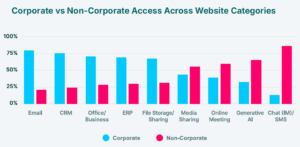
The identity layer is often seen as hardened with SSO, MFA and identity federations. But most of that protection never touches what happens inside the browser. Over two-thirds of corporate login events happen without SSO. 43% of SaaS access is done via personal credentials. 8% of enterprise users have extensions that access identities or cookies.
Recent high-profile breaches like the Scattered Spider campaign highlight how identity compromise no longer depends on stolen passwords, but it thrives on stolen sessions. Attackers exploited browser-stored tokens and cookies to impersonate users, move laterally across SaaS apps, and bypass MFA entirely. The attack revealed that modern identity risk isn’t at the login prompt; it’s inside active browser sessions, where cookies, credentials, and cached tokens circulate unprotected. Even the most mature IAM setups were powerless because traditional tools couldn’t see what happened inside the browser.
Put simply: identity governance ends at the API, but risk continues in the browser session. Session tokens, cookies, unmanaged credentials, and shadow accounts all converge inside the browser where traditional IAM tools have no visibility.
File Uploads Used to Be the Weak Link, but Now It’s Copy/Paste
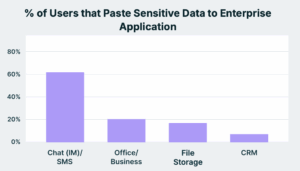
For years, file-based DLP focused on attachments, uploads, and shared drives. 38% are uploading files to file-sharing platforms; 41% of files uploaded there contain PII/PCI. But uploads are no longer the dominant risk, the “clipboard” is.
Most sensitive data leaves the enterprise via copy/paste into unmanaged browser accounts, prompts, chat and IM tools. Now, 77% of employees are pasting data into GenAI tools. File Storage, which accounts for 46% is the second largest paste channel and is followed by Chat/IM and CRM, which are at about 15%. While lower overall in volume, pastes into business-critical apps carry outsized risks because of the nature of the data involved. These file-less, data-aware movements typically bypass every file-centric DLP control in place today and are a cause of the biggest data leaks that happen in the world.
The recent Rippling–Deel scandal underscores how unmonitored SaaS and browser-based messaging apps have become silent exfiltration vectors. Confidential client information and sensitive internal discussions were exposed through instant messaging apps. This incident shattered the illusion that enterprise collaboration apps are “secure by default.” A single unsanctioned plug-in or chat AI can quietly exfiltrate thousands of internal messages with a simple copy/paste action.
The Browser Isn’t Just a Workplace Tool; It’s the Enterprise’s Largest Unprotected Endpoint
The browser now touches every identity, every SaaS app, every piece of enterprise data. It spans managed and unmanaged devices, sanctioned and unsanctioned apps, personal and corporate accounts. But despite all that, the browser remains outside the visibility of DLP, EDR, SSE, and CASB platforms.
And as the boundary between data-access and data-leakage disappears inside the browser, the perimeter that was once defined by devices and networks has moved into the browser tab bar.
What to Do Now: Your Browser-Native Security Roadmap
Security leaders must now shift their thinking from devices, networks, and files to treat the browser as the frontline for identity, data and AI risk. Here’s how:
- Treat the browser as a primary control plane, not a UI
If risk originates in session, controls must live in session. That means real-time, browser-native visibility into uploads, copy/paste, prompts, and account context (personal vs. corporate). Extend controls to unmanaged browsers and AI-centric browsers that auto-summarize, auto-prompt, and quietly ship session context to cloud models. - Shift identity protection from authenticate-and-forget to protect-the-session
Enforce SSO/MFA where possible, but assume drift. Continuously validate active sessions, watch for token replay, and detect account crossover. “Identity done” at the IdP is a comforting myth; the browser is where identity risk accrues. - Operationalize extension governance as a supply-chain software
Permission audit alone is insufficient. Continuously score developer reputation, update cadence, sideload sources, and AI/agent capabilities. Track changes like you track third-party libraries. - Block data loss at the point of interaction
Files matter but inputs matter more. Implement browser-native DLP that watches copy/paste, drag/drop, prompt-inputs and files. Extend controls to unmanaged users and classify data in-motion (PII/PCI) to block risky actions to exfiltrate sensitive data before it leaves the tab. - Empower users, don’t paralyze them
Don’t just “block everything users might want to do.” Provide safe, sanctioned AI and SaaS options with clear guardrails, educate employees, and build the policies around data behaviour, not the app itself.
The Bottom Line
Enterprises have spent years building governance around email, file-sharing and identity federations. Yet at the same time, the most browser-centric part of workflows: extensions, GenAI prompts, identities and SaaS sessions has grown entirely unchecked.
The surprising paradox: the faster the browser becomes indispensable to productivity, the less oversight it has.
Security leaders now face a simple reality: if you can’t see what users are doing in their browser, you’re not only behind, but you’re invisible to your biggest risk surface. The browser isn’t optional anymore; it’s the control plane of every enterprise workflow. And until you treat it that way, the data flow will leave, and you’ll only find out after it’s gone.
Download the full report to uncover the full scale of the Top Browser Security Risks in 2025