Security teams are racing to secure the browser as employees adopt powerful new add-ons for productivity. This guide ranks the leading AI extension security platforms that provide the visibility and control needed to manage these tools safely and prevent data loss.
What Are AI Extension Security Tools and Why They Matter
AI extension security platforms are specialized solutions designed to manage the risk of browser add-ons in the enterprise. These tools inspect extension code, monitor behavior, and enforce policies to prevent “Shadow SaaS” and data exfiltration. As browsers become the primary workspace, these platforms are essential for stopping malicious extensions that can bypass traditional network defenses.
The rise of generative AI has accelerated the need for these solutions. Employees increasingly install AI-powered extensions to summarize pages or draft emails, inadvertently granting these tools access to read sensitive corporate data. Dedicated security platforms provide the granular visibility required to allow safe productivity tools while blocking those that pose a threat to compliance or intellectual property.
Key AI Extension Security Trends to Watch in 2026
Attacks using “polymorphic” extensions are becoming a primary concern for security leaders. These malicious add-ons constantly change their code signatures and metadata to evade static detection, often masquerading as legitimate tools like PDF readers or coupon finders. This trend is forcing the market to move toward behavioral analysis that detects malicious intent at runtime rather than relying on reputation lists alone.
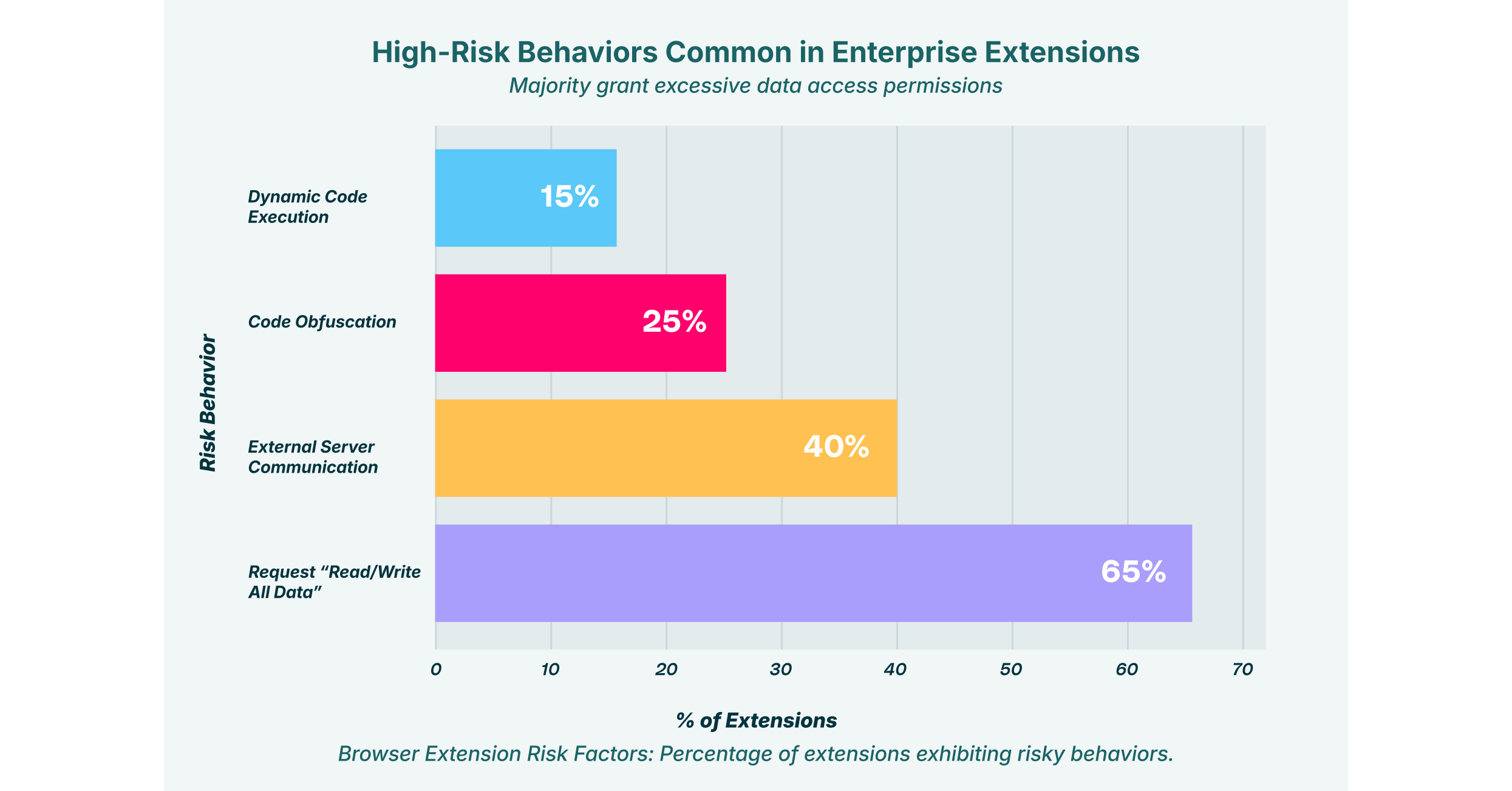
Another major trend is the focus on “Shadow AI” governance within the browser. Organizations are realizing that network firewalls cannot see what happens inside an encrypted browser session, especially when data is pasted directly into an AI extension. Modern security platforms are evolving to inspect the DOM (Document Object Model) in real time, allowing them to redact sensitive PII before it is sent to an external AI model.
We are also seeing a convergence of browser security and identity protection. Attackers are using extensions to steal session tokens and MFA cookies, allowing them to hijack authenticated sessions without needing a password. Leading solutions now integrate identity signals to detect when an extension is attempting to access a session in an unauthorized manner, providing a critical layer of defense against account takeover.
9 Best AI Extension Security Platforms for 2026
These top-rated solutions offer the robust capabilities needed to secure the enterprise browser environment against modern threats.
| Solution | Key Capabilities | Best for |
| LayerX | Real-time monitoring of all extension activity and data flow | Comprehensive protection against malicious and risky extensions |
| SquareX | Runtime analysis of extension behavior and file downloads | Defending against polymorphic and evasive extension attacks |
| Spin.AI | Automated risk assessment and compliance auditing | Automated risk scoring for Google Workspace environments |
| Harmonic Security | Zero-touch data protection with real-time user nudges | Guiding user behavior without heavy-handed blocking |
| Seraphic Security | Exploit prevention engine for unmanaged devices | Preventing zero-day browser exploits and code injection |
| Nightfall AI | AI-powered DLP and data redaction in the browser | Preventing sensitive data leakage into AI prompts |
| Lasso Security | Shadow AI discovery and access control | Visibility into unapproved GenAI tools and extensions |
| Prompt Security | Detection of GenAI usage and prompt injection attacks | Securing GenAI adoption and preventing prompt manipulation |
| Koi Security | Deep infrastructure analysis of extension developers | Detecting sophisticated extension malware and C2 infrastructure |
1. LayerX


LayerX provides a browser-agnostic security platform that transforms any standard browser into a secure, monitored workspace. It offers deep visibility into every extension installed across the organization, analyzing permissions and code behavior in real time. The platform assigns dynamic risk scores to extensions based on their actual activity, allowing security teams to automatically block high-risk add-ons that attempt to steal credentials or exfiltrate data.
Beyond blocking malware, LayerX effectively manages “Shadow AI” risks by monitoring how extensions interact with generative AI tools. It prevents extensions from injecting malicious prompts or scraping sensitive output from corporate web sessions. This capability ensures that employees can use approved AI productivity tools safely while the organization remains protected from data leakage and extension-based campaigns.
2. SquareX


SquareX is built to detect and respond to client-side web attacks, including those from malicious browser extensions. Its unique value lies in its ability to analyze extension behavior dynamically at runtime, identifying when an extension attempts to change its code or impersonate a trusted app. This “polymorphic” detection capability is critical for stopping modern attacks that evade static analysis.
The platform empowers security teams to threat-hunt within the browser environment. It offers capabilities to isolate risky sessions and block malicious file downloads initiated by compromised extensions. This proactive approach helps organizations defend against sophisticated social engineering attacks where users are tricked into installing harmful software.
3. Spin.AI


Spin.AI offers a specialized module called SpinMonitor that focuses on assessing the risk of browser extensions within Google Workspace. It automates the vetting process by scanning extensions for security loopholes, excessive permissions, and compliance violations. The system generates a clear risk score for each app, giving IT administrators immediate insight into the potential impact on their data privacy.
This solution is particularly valuable for teams managing a high volume of extension requests. SpinMonitor can automatically revoke access to extensions that are deemed risky or that violate company policies. This automation significantly reduces the manual workload for security analysts who would otherwise have to review the code of every requested add-on.
4. Harmonic Security


Harmonic Security takes a unique approach to data protection by emphasizing user education and real-time guidance. Their “Harmonic Protect” solution monitors data flow in the browser and uses pre-trained language models to assess the sensitivity of data before it leaves the organization. When a user attempts to share sensitive info via an extension, the system “nudges” them to reconsider or directs them to a safer alternative.
This “zero-touch” philosophy avoids the friction associated with complex, rule-based DLP tools. By involving the end-user in the security decision, Harmonic reduces the operational burden on IT teams. It is an excellent choice for organizations that want to encourage safe AI adoption without resorting to the strict blocking of all browser extensions.
5. Seraphic Security


Seraphic Security focuses on prevention by assuming that all code entering the browser could be malicious. Their technology injects a security layer into the browser’s JavaScript engine to prevent exploits and code injection attacks. This method is highly effective against malicious extensions that attempt to compromise the browser’s integrity or exploit unpatched vulnerabilities.
The platform works across various browsers and is designed to protect hybrid work environments, including unmanaged devices. By focusing on exploit prevention rather than just detection, Seraphic aims to stop attacks before they can execute. This makes it a strong option for enterprises concerned about zero-day threats and sophisticated attacks that bypass standard detection.
6. Nightfall AI


Nightfall AI brings its data loss prevention expertise directly to the browser with a specialized extension security solution. It focuses on detecting and redacting sensitive data like PII, API keys, and credit card numbers before they can be pasted into AI prompts or third-party extensions. This proactive redaction ensures that even if an employee uses an unapproved tool, the data remains secure.
The platform integrates seamless alerts that educate users in real time when they handle sensitive data improperly. Nightfall’s ability to classify data contextually within the browser makes it a powerful tool for compliance-focused organizations. It allows teams to enforce strict data governance policies without completely blocking the use of productivity extensions.
7. Lasso Security

Lasso Security addresses the “Shadow AI” challenge by providing comprehensive visibility into all GenAI tools and extensions used in the enterprise. Its discovery engine identifies every interaction with AI models, categorizing them by risk level and ensuring that security teams know exactly which extensions are active. This visibility is crucial for understanding the true scope of AI adoption and data risk.
The platform enables organizations to implement role-based access controls for AI usage. Administrators can define policies that allow specific departments to use approved AI extensions while blocking access for others. This granular control helps balance the productivity benefits of AI with the need to maintain strict data governance standards.
8. Prompt Security


Prompt Security focuses specifically on securing the intersection of browsers and Generative AI. Their solution includes a browser extension that inspects prompts and outputs to prevent data leakage and block prompt injection attacks. It detects when employees use GenAI tools and applies security policies to ensure that sensitive corporate data is not pasted into public models.
The tool also protects against malicious extensions that might try to manipulate GenAI sessions. By monitoring the interaction between the user, the browser, and the AI model, Prompt Security can identify and block “Man-in-the-Prompt” attacks where an extension attempts to alter instructions sent to an LLM. This secures the integrity of AI workflows and protects against indirect injection attacks.
9. Koi Security


Koi Security specializes in deep threat detection for the browser extension ecosystem. Their research team has uncovered massive extension-based malware campaigns like “DarkSpectre,” which infected millions of users. The platform focuses on identifying the underlying infrastructure used by attackers, such as the command-and-control servers that legitimate-looking extensions connect to after installation.
This infrastructure-first approach allows Koi to detect “risky update channels” where a benign extension might be sold to a malicious actor. By monitoring these backend connections and ownership changes, Koi provides early warning signals that purely behavior-based tools might miss. This makes it an essential tool for organizations that need to detect advanced persistent threats hiding in their browser fleet.
How to Choose the Best AI Extension Security Provider
- Prioritize platforms that offer real-time visibility into all installed extensions and their permission scopes across your entire fleet.
- Ensure the solution can detect and block extension-based threats using behavioral analysis rather than just static blacklists.
- Select a provider that specifically addresses “Shadow AI” by monitoring data flow to and from generative AI extensions.
- Verify that the tool can enforce granular policies, such as allowing an extension for one department while blocking it for others.
- Choose a solution that integrates seamlessly with your existing browser management workflow to minimize deployment friction.
FAQs
What makes AI browser extensions dangerous?
AI extensions often require broad permissions to function, such as the ability to “read and change all your data on the websites you visit.” If such an extension is malicious or compromised, it can capture sensitive corporate data, login credentials, and proprietary code from any page the user visits. Attackers can also use them to inject malicious prompts into AI models, manipulating the output or exfiltrating data covertly.
Can traditional antivirus software detect malicious extensions?
Traditional antivirus tools typically scan files on the device’s hard drive and may miss threats that live entirely within the browser environment. Malicious extensions often execute code dynamically or load payloads from remote servers after installation, techniques that bypass file-based scanning. Dedicated extension security tools monitor the browser’s runtime behavior to catch these evasive threats.
How do these platforms prevent data leakage?
Extension security solutions monitor the data interactions between the browser and external applications. They can block users from pasting sensitive information (like customer PII or API keys) into GenAI chat interfaces or extension pop-ups. Some tools also use AI to analyze the context of the data being shared and intervene if it violates corporate policy.
What is the difference between an enterprise browser and an extension security tool?
An enterprise browser is a standalone web browser that replaces the standard Chrome or Edge browser, offering built-in security features. An extension security tool, like LayerX, is a lightweight add-on that installs into the existing commercial browsers employees already use. This allows organizations to add enterprise-grade security and visibility without forcing users to switch to a new, unfamiliar browser interface.
Why is “Shadow AI” a problem for enterprises?
Shadow AI refers to the unsanctioned use of AI tools and extensions by employees without IT oversight. This creates significant risks because security teams cannot protect data they don’t know is being shared. Unmonitored AI extensions can silently collect vast amounts of corporate information, leading to compliance violations and intellectual property theft.