As organizations rush to adopt GenAI, implementing effective ChatGPT security has become the top priority for CISOs in 2026. This guide reviews the leading solutions that prevent data leakage, block prompt injections, and govern shadow AI usage without slowing down workforce productivity.
What Are ChatGPT Security Tools and Why They Matter
ChatGPT security tools are specialized solutions designed to monitor, govern, and secure the interaction between enterprise users and Generative AI platforms. Unlike traditional firewalls or legacy DLP systems, these tools sit directly in the user’s workflow, often within the browser, to inspect prompts and responses in real time. They prevent employees from accidentally pasting sensitive PII or IP into public models while blocking malicious extensions that attempt to hijack sessions.
For enterprise security leaders, these tools are the only line of defense against the “browser to cloud” attack surface. With ChatGPT becoming the de facto operating system for many roles, the risk of shadow SaaS has exploded. Dedicated security tools provide the necessary visibility to see which AI applications are actually running, ensuring that corporate data remains isolated from public training models and that all usage complies with emerging 2026 regulatory frameworks.
Key ChatGPT Security Trends to Watch in 2026
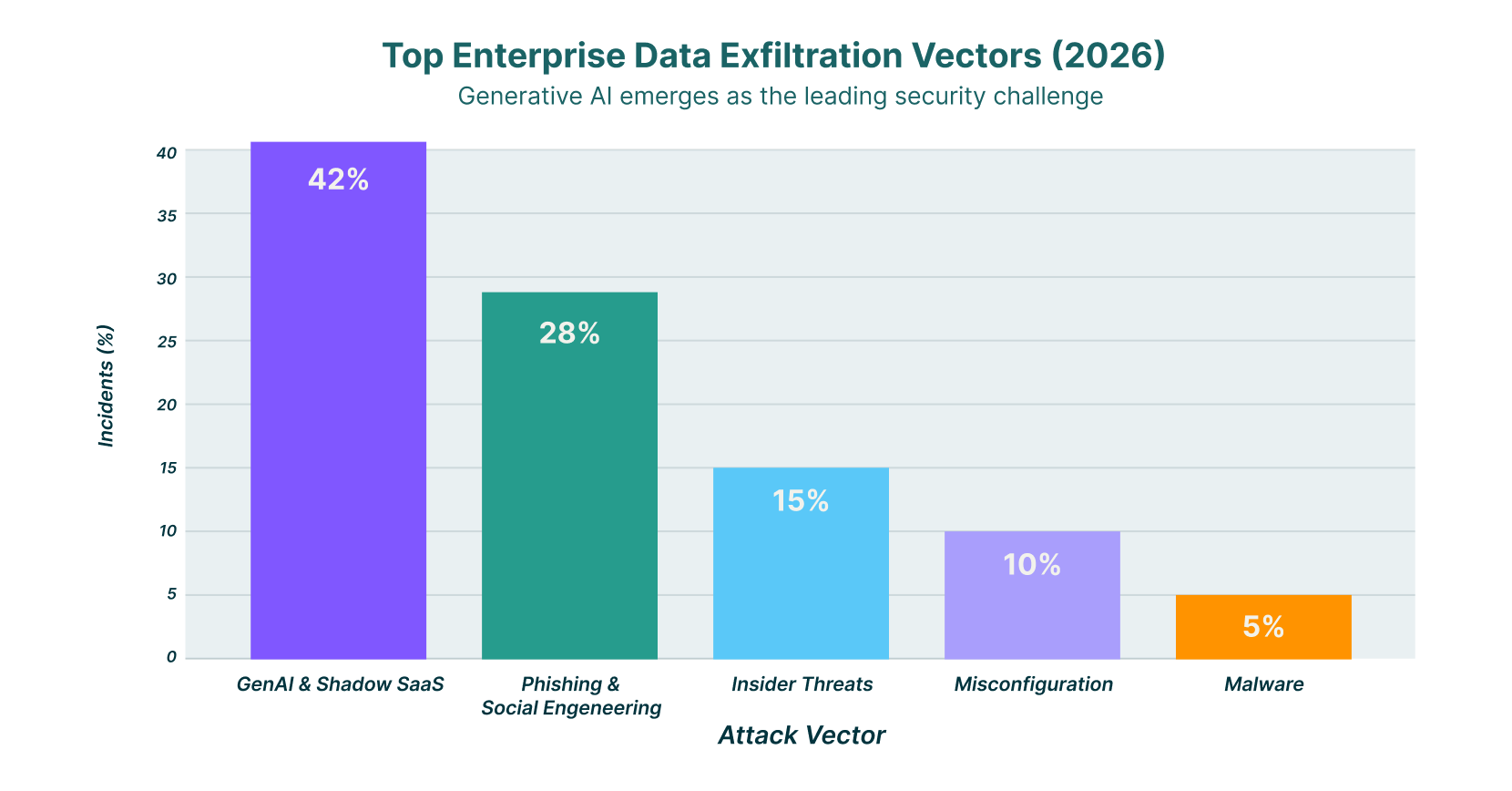
In 2026, AI has officially overtaken phishing as the number one vector for data exfiltration in the enterprise. Attackers are no longer just trying to steal credentials; they are manipulating the AI models themselves. New research has uncovered vulnerabilities like “ZombieAgent” and “HackedGPT,” where attackers use indirect prompt injection to turn an employee’s own AI assistant into a tool for exfiltrating private memory and chat history.
The rise of “Agentic AI,” where AI systems can execute actions autonomously, has introduced significant new risks. Browsers that integrate these agents, such as ChatGPT Atlas, have been found to contain vulnerabilities that allow malicious extensions to bypass standard security boundaries. This shift means security teams can no longer just block URLs; they must monitor the actual intent and execution logic of AI agents running within the browser session.
Commercialized AI cybercrime is also reshaping the threat landscape. “Jailbreak-as-a-Service” platforms are now sold on the dark web, allowing even low-skilled attackers to bypass the safety guardrails of enterprise LLMs. In response, regulatory pressure is forcing organizations to prove they have “human-in-the-loop” oversight and granular data governance for every AI interaction, moving compliance from a checkbox exercise to a continuous operational requirement.
8 Best ChatGPT Security Tools for 2026
The following list highlights the top solutions for securing GenAI usage, ranging from browser-native platforms to dedicated GenAI firewalls.
| Solution | Key Capabilities | Best for |
| LayerX | Real-time browser DLP, full conversation tracking, and shadow AI blocking | Universal protection across any browser |
| Island | Full enterprise browser environment, integrated DLP, isolated sessions | Teams replacing standard browsers |
| Harmonic Security | “Zero touch” data protection, compliance visibility, and shadow AI monitoring | Data governance without friction |
| SquareX | Malicious extension detection, file isolation, browser-native protection | Stopping client-side attacks |
| Menlo Security | Remote Browser Isolation (RBI), paste protection, and file upload controls | Isolating high-risk users |
| Koi Security | Shadow IT discovery, extension risk scoring, and data selling prevention | Managing browser extension risks |
| Prompt Security | Prompt injection protection, shadow IT detection, and content moderation | Preventing prompt-based attacks |
| Seraphic Security | Exploit prevention, anti-phishing, fine-grained data controls | Preventing browser exploits |
1. LayerX

LayerX is a browser-native security platform that provides real-time protection against ChatGPT data leakage and web-borne threats. Delivered as a lightweight extension, it turns any commercial browser into a secure workspace without requiring a new browser infrastructure. LayerX offers deep visibility into user interactions, capturing full conversation context, both prompts and responses, to detect when sensitive data like PII or source code is being shared.
Beyond monitoring, LayerX actively enforces granular policies to block risky actions before they happen. It can disable the “paste” function for specific data types, block unauthorized browser extensions that try to read ChatGPT sessions, and eliminate shadow AI by restricting access to non-sanctioned tools. Its ability to act at the session level ensures that security travels with the user, whether they are on a managed device or a BYOD endpoint.
2. Island

Island takes a different approach by replacing the standard consumer browser with a dedicated “Enterprise Browser.” This gives IT teams complete control over the entire browsing environment, including the ability to embed security controls directly into the user interface. Island’s integrated DLP engine can prevent sensitive data from being pasted into ChatGPT, restrict file uploads, and even block screenshots of sensitive sessions.
For 2026, Island has integrated features like the “Island AI Assistant,” which allows users to access ChatGPT capabilities within a governed sidebar that is fully monitored by corporate policy. This ensures that employees have access to productivity tools while the organization maintains strict boundaries around data movement. It is a powerful solution for organizations willing to migrate their workforce to a new browser interface.
3. Harmonic Security

Harmonic Security adopts a “zero touch” data protection philosophy, aiming to stop data leaks without stifling innovation or frustrating employees. The platform focuses on visibility, identifying “Shadow AI” usage so that security teams can see exactly which tools are being accessed and what data is flowing to them. It uses pre-built data protection models to identify sensitive information without complex manual configuration.
The solution is designed to help organizations “get to yes” on AI adoption by providing the necessary compliance safeguards. Harmonic monitors data at rest and in transit, ensuring that employee use of tools like ChatGPT adheres to privacy policies. Its low-friction approach is ideal for cultures that prioritize agility and want to avoid heavy-handed blocking policies.
4. SquareX

SquareX focuses on neutralizing client-side threats that target the browser, including malicious extensions and file-based attacks. Its platform is particularly effective at detecting “Shadow IT” extensions that users might install to enhance their ChatGPT experience, but which actually harvest sensitive chat logs. SquareX isolates these risks in real-time, preventing unauthorized code from executing within the browser session.
In 2026, SquareX expanded its capabilities to protect against “AI Sidebar Spoofing,” a technique where attackers mimic AI assistants to trick users into revealing credentials. By monitoring the DOM for suspicious modifications, SquareX ensures that the ChatGPT interface users are interacting with is genuine and secure. This makes it a critical tool for organizations worried about sophisticated browser-based social engineering.
5. Menlo Security

Menlo Security leverages its core Remote Browser Isolation (RBI) technology to create a secure buffer between the user and GenAI platforms. By executing the browser session in a remote container, Menlo ensures that no malicious code from a compromised AI tool can reach the endpoint. For data protection, it applies strict copy-paste controls, preventing users from moving sensitive data from their local clipboard into the remote ChatGPT session.
The platform also inspects file uploads to GenAI tools, stripping metadata and scanning for hidden threats before files are processed. This isolation approach is highly effective for high-risk users or departments that frequently interact with untrusted external content. It allows organizations to embrace ChatGPT’s productivity benefits while maintaining a “Zero Trust” posture towards web content.
6. Koi Security

Koi Security specializes in managing the risks associated with browser extensions, a major vector for data leaks in GenAI environments. Their platform inventories all installed extensions and scores them based on their data collection practices, flagging those that are known to sell user data or read browser history. This visibility helps IT teams identify “free” AI writing assistants that are actually monetizing corporate intellectual property.
By blocking high-risk extensions, Koi prevents third-party tools from scraping the text inside ChatGPT windows. This ensures that sensitive conversations remain private and are not silently exfiltrated by a background process. For organizations with a large, decentralized workforce using Chrome or Edge, Koi provides a necessary layer of governance over the browser extension ecosystem.
7. Prompt Security
Prompt Security focuses on securing the full lifecycle of Generative AI adoption, from employee usage of public tools to the development of internal LLM applications. Their platform inspects every prompt and model response to prevent data exposure and block prompt injection attacks. It includes specific modules for “Shadow AI” detection, helping IT teams uncover and categorize every GenAI tool in use across the network.
The tool excels at content moderation and sanitization. It can automatically redact sensitive information from prompts in real time, ensuring that PII never leaves the organization’s perimeter. For companies building their own AI agents, Prompt Security offers protection against jailbreaking attempts and toxic output, making it a strong choice for engineering teams deploying customer-facing AI.
8. Seraphic Security

Seraphic Security transforms any standard browser into a secure enterprise browser through a lightweight agent, offering protection against exploits and data loss. Its “Exploit Prevention” engine uses chaos engineering principles to make the browser environment unpredictable to attackers, stopping zero-day exploits that might target vulnerabilities in the underlying browser engine or GenAI interfaces.
For ChatGPT security, Seraphic enforces fine-grained policies that control what data can be shared. It can disable specific browser features, like screen capture or developer tools, while a user is on the OpenAI domain, reducing the risk of data theft. This approach provides deep security controls without the heavy infrastructure lift of VDI or full browser replacement.
How to Choose the Best ChatGPT Security Tool
- Evaluate whether you need a browser-agnostic extension like LayerX or are willing to replace your entire browser with a solution like Island.
- Prioritize tools that offer real-time “paste blocking” and data redaction to stop leaks before they leave the endpoint.
- Look for “Shadow AI” discovery capabilities that can identify unauthorized GenAI apps running outside of your SSO environment.
- Ensure the solution can inspect encrypted traffic and understand the context of the conversation, not just simple URL filtering.
- Select a provider that offers detailed audit logs of both prompts and responses to satisfy emerging 2026 compliance requirements.
FAQs
1. Is ChatGPT secure for enterprise use in 2026?
ChatGPT Enterprise offers strong encryption and SOC 2 compliance, but the primary risk remains user behavior and account configuration. While OpenAI protects the infrastructure, it cannot stop an employee from voluntarily pasting a customer database into a prompt. Secure usage requires an additional layer of browser-side governance to control what data enters the model.
2. How do I prevent employees from pasting sensitive data into ChatGPT?
The most effective method is using a browser security platform or extension that inspects text input fields in real time. Tools like LayerX and Nightfall AI can detect when a user attempts to paste PII or IP into the ChatGPT window and block the action immediately, displaying a warning to the user explaining the policy violation.
3. What is the difference between a secure enterprise browser and a browser extension?
A secure enterprise browser, like Island, is a standalone application that replaces Chrome or Edge entirely, offering total control over the environment but requiring a user behavior change. A browser extension, like LayerX, installs on top of existing browsers, adding security and monitoring capabilities without forcing users to switch to a new interface or lose their personalized settings.
4. Can legacy DLP tools protect against GenAI data leaks?
Legacy DLP tools often struggle with GenAI because they typically operate at the network or file level, missing the context of data pasted into a web form. They may block a whole website, but cannot granularly filter specific text strings within a chat session. Modern browser-native security tools are designed specifically to understand DOM-level interactions and provide the necessary granularity.
5. What are “Agentic AI” risks?
Agentic AI refers to AI systems that can execute tasks autonomously, such as browsing the web or sending emails on a user’s behalf. The risk is that if these agents are compromised (e.g., via prompt injection), they can be manipulated to perform malicious actions like exfiltrating data or installing malware without the user’s explicit consent. Security tools must now monitor the actions of these agents, not just the text they generate.