Enterprise browser platforms have become the primary defense line for modern security teams who need to secure the “last mile” of access. These solutions provide granular visibility and control over web sessions to prevent data leakage and block malicious extensions.
What Are Enterprise Browser Platforms and Why They Matter
Enterprise browser platforms are specialized security solutions designed to govern how users interact with the web, SaaS applications, and generative AI tools. Unlike traditional web gateways that only filter traffic at the network level, these solutions sit directly inside or around the browsing session. They can see the context of user actions, such as copying sensitive customer data into a personal email or installing a risky browser extension, and block those specific actions in real time without stopping the entire workflow.
This capability matters because the browser has effectively become the new operating system for the enterprise. With the massive shift to SaaS and the decline of the traditional network perimeter, adversaries now target the browser to bypass legacy defenses like VPNs and firewalls. By securing the browser itself, organizations can protect unmanaged devices and third-party contractors without forcing them to install heavy agents or use virtual desktop infrastructure.
Furthermore, the rise of “Shadow SaaS” and “Shadow AI” has made browser-level visibility critical for compliance and data protection. Employees frequently use unauthorized AI tools or productivity extensions that can silently exfiltrate proprietary code or PII. Enterprise browser solutions close this gap by auditing every extension and enforcing policies that prevent sensitive data from ever leaving the browser environment.
Key Enterprise Browser Trends to Watch in 2026
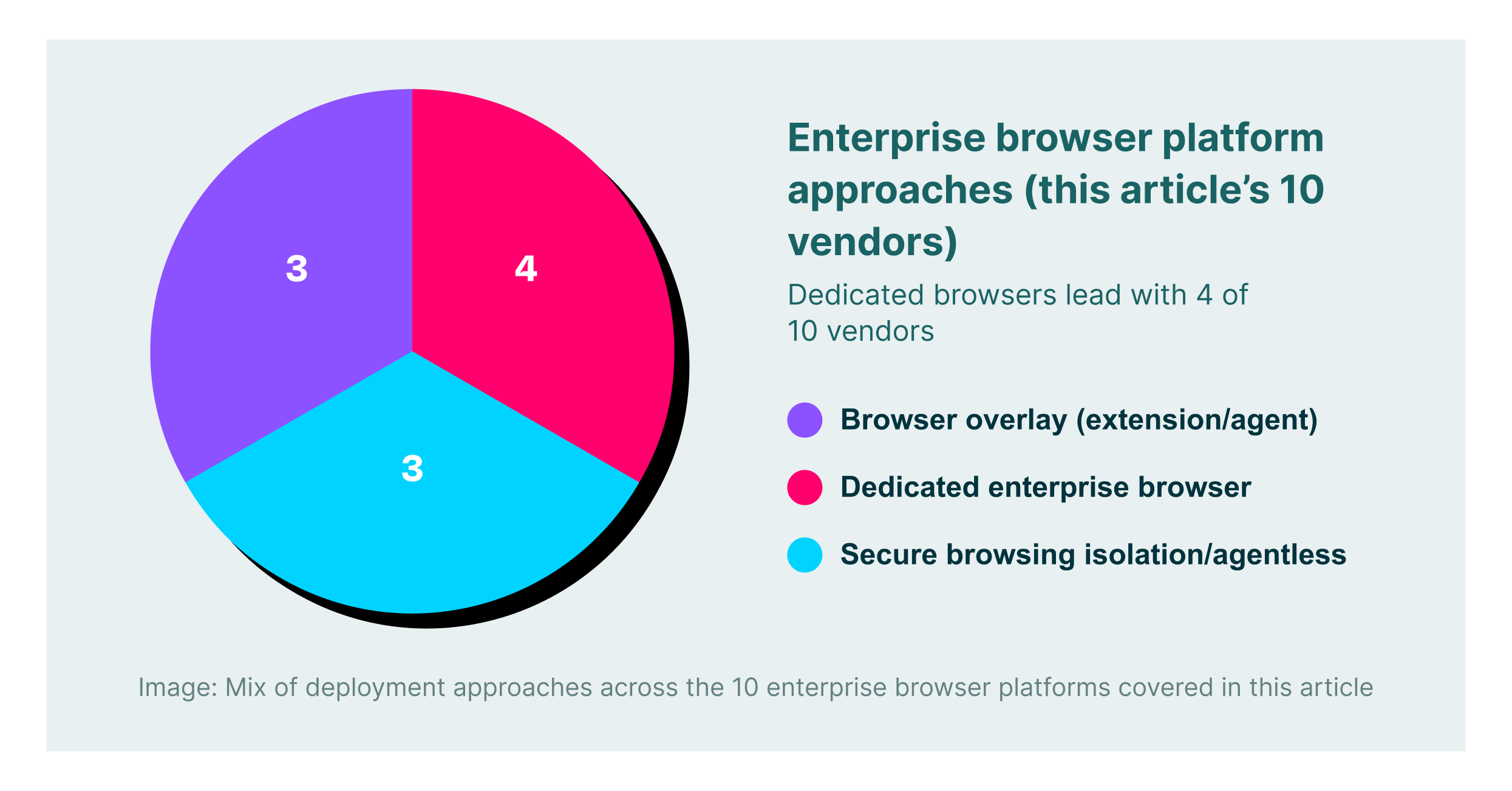
The market is moving away from “replacement” browsers that force users to switch to a custom browser and toward “browser-agnostic” platforms. Security leaders increasingly prefer extension-based or agentless approaches that overlay security onto standard browsers like Chrome and Edge. This shift allows enterprises to maintain user productivity and familiar workflows while still enforcing deep security controls on both managed and unmanaged devices.
Generative AI data leakage protection has become a standard requirement rather than an optional feature. In 2026, the best solutions will not just block access to AI sites but will offer granular “in-line” controls. For example, a user might be allowed to use ChatGPT for research but blocked from pasting source code or customer lists into the prompt window. This nuance enables safe adoption of productivity tools without exposing the organization to massive data risks.
Browser Detection and Response (BDR) is emerging as a critical capability for security operations centers. Teams are demanding the same level of telemetry from the browser that they get from Endpoint Detection and Response (EDR) tools on the OS. This trend drives vendors to provide detailed logs of session activity, file interactions, and extension behaviors so that analysts can hunt for threats and reconstruct attack timelines faster.
10 Best Enterprise Browser Platforms for 2026
Below is a comparison of the top platforms available this year, ranging from flexible extensions to full browser replacements.
| Solution | Key Capabilities | Best for |
| LayerX | Universal extension, GenAI DLP, extension risk management | Browser-agnostic security without user friction |
| Island | Custom Chromium browser, deep OS integration, RPA | Organizations wanting a dedicated, locked-down browser |
| Palo Alto Networks (Prisma) | SASE integration, Zero Trust access, traffic inspection | Current Palo Alto customers needing SASE alignment |
| Surf Security | Zero Trust access, unmanaged device support, simplified UI | Securing BYOD and third-party contractors |
| Menlo Security | Remote browser isolation, browsing forensics, and cloud delivery | Eliminating malware risk via isolation |
| Seraphic Security | Exploit prevention, moving target defense, JavaScript agent | Stopping zero-day browser exploits |
| Red Access | Agentless architecture, session recording, and hybrid work support | Rapid deployment without endpoint agents |
| Mammoth Cyber | Remote access replacement, policy-based routing | VPN replacement for specific web apps |
| SquareX | Disposable browsers, malicious file analysis, BDR | Isolating high-risk tasks and file handling |
| Conceal | Click isolation, AI-powered URL analysis | Protecting against phishing and ransomware links |
1. LayerX


LayerX provides a user-first enterprise browser solution that works as a lightweight extension on any standard browser. It transforms Chrome, Edge, or Safari into a secure workspace without requiring users to migrate to a new custom browser. This approach ensures 100% compatibility with existing workflows while delivering deep visibility into web sessions. Security teams use LayerX to prevent data leakage in GenAI apps, block malicious extensions, and govern Shadow SaaS usage across the entire workforce.
The platform stands out for its granular policy enforcement that goes beyond simple blocking. For instance, it can disable “paste” functionality on specific fields in AI tools or redact sensitive data in real time. LayerX is particularly effective for protecting unmanaged devices and third-party contractors because it does not require an agent on the device itself. Its “extension-first” architecture allows for rapid deployment across thousands of users in minutes, making it a favorite for agile enterprises.
2. Island


Island is a “commercial enterprise browser” built on the Chromium engine that is designed to replace standard browsers completely. It gives IT teams deep control over the browser environment, including the ability to restrict screenshots, copy-pasting, and file downloads at a fundamental level. Island integrates heavily with the operating system to provide a “desktop-like” experience for web applications, often replacing the need for VDI in call centers or high-security environments.
The platform includes built-in productivity features such as smart clipboard managers and robotic process automation (RPA) tools to speed up repetitive tasks. While it offers robust security, deploying Island requires users to change their daily habits and migrate bookmarks and settings to the new application. It is best suited for organizations that want to define a strict boundary between “work” and “personal” browsing by forcing all corporate traffic through a single, managed application.
3. Palo Alto Networks (Prisma Access Browser)


Formerly known as Talon, the Prisma Access Browser is now fully integrated into Palo Alto Networks’ SASE ecosystem. It offers a secure workspace that extends Zero Trust Network Access (ZTNA) principles to the browser, ensuring that only verified users and healthy devices can access corporate applications. The solution leverages Palo Alto’s massive threat intelligence network to block malicious URLs and file downloads in real time.
Prisma Access Browser is ideal for organizations already invested in the Palo Alto stack, as it simplifies policy management through a single console. It can be deployed as a standalone browser or an extension, giving IT some flexibility in how they roll it out. The tool focuses heavily on securing the “edge” of the network, making it a strong contender for global enterprises that need consistent security policies across a dispersed hybrid workforce.
4. Surf Security


Surf Security positions itself as a “Zero Trust Enterprise Browser” that focuses on simplifying the security stack for unmanaged devices. It aims to replace multiple disjointed tools like VPNs and CASBs with a single browser interface that handles access and security. Surf emphasizes a clean user interface and minimal setup complexity, allowing organizations to onboard freelancers and partners quickly without shipping corporate laptops.
The platform offers strong identity-based controls and device posture checks before granting access to sensitive apps. Surf’s architecture isolates corporate data from the personal device, ensuring that no residue is left behind after a session ends. This makes it a practical choice for companies with heavy reliance on BYOD policies or short-term contractors who need secure, temporary access to internal portals.
5. Menlo Security


Menlo Security has evolved from its roots in Remote Browser Isolation (RBI) to offer a comprehensive “Secure Enterprise Browser” solution. Its core strength remains its isolation technology, which executes all web content in a remote cloud container before rendering a safe version to the user. This effectively neutralizes malware and ransomware threats because active code never reaches the endpoint.
Recently, Menlo has added “Browsing Forensics” and a browser posture manager to its offering. These features give security teams a timeline view of user actions and help identify misconfigurations in Chrome or Edge. Menlo is particularly strong for highly regulated industries where the risk of web-borne malware is unacceptable, providing a “pixel-perfect” rendering that keeps the user safe from compromised websites.
6. Seraphic Security


Seraphic Security takes a unique approach by focusing on “exploit prevention” and runtime protection within any standard browser. Instead of building a custom browser, Seraphic injects a lightweight JavaScript agent into the browser session to monitor execution flow. This allows it to detect and block sophisticated attacks like heap spraying and use-after-free exploits that traditional detection might miss.
The platform also employs “Moving Target Defense” technology to randomize browser memory structures, making it extremely difficult for attackers to find vulnerabilities. Seraphic is a strong choice for security teams worried about zero-day browser vulnerabilities and advanced persistent threats. It works across different browsers and operating systems, providing a consistent layer of defense without altering the user interface.
7. Red Access


Red Access offers an “agentless” browsing security platform that secures web sessions without requiring installed extensions or local agents. It operates as a smart proxy or middle layer that inspects traffic and enforces policies for any browser, creating a “session recording” capability that is highly valuable for audits. This architecture is designed to cover every device, including those where installing software is impossible or prohibited.
The platform enables hybrid enterprises to secure “browsing” rather than just the “browser,” extending protection to desktop web apps and other non-standard web views. Red Access is easy to deploy and scales well for organizations that need immediate visibility into contractor access. Its agnostic nature means it can layer on top of existing setups without conflict.
8. Mammoth Cyber


Mammoth Cyber provides an “Enterprise Access Browser” that combines a Chromium-based browser with a policy engine to secure remote access. It is specifically positioned as a modern alternative to VPNs for accessing internal web applications and cloud infrastructure. The tool allows granular control over user actions like printing, screen capturing, and downloading files based on the user’s role and device health.
The platform focuses on the specific use case of granting secure access to third parties and remote employees. It includes features to tunnel traffic securely to private apps without exposing the entire network. Mammoth Cyber is a good fit for organizations looking to retire legacy VPN concentrators in favor of a browser-based access model.
9. SquareX


SquareX focuses on “Browser Detection and Response” (BDR) and the concept of “disposable browsers.” It allows users to open suspicious links or files in a temporary, isolated cloud browser that is destroyed after use. This separation ensures that even if a file is malicious, it cannot infect the user’s local machine or corporate network.
The platform also provides deep visibility into malicious file downloads and acts as a layer of defense against “browser-in-the-browser” phishing attacks. SquareX is designed for power users and security analysts who frequently handle untrusted content. Its ability to spin up isolated environments on the fly makes it a unique tool for high-risk workflows.
10. Conceal


Conceal offers “ConcealBrowse,” a solution that uses AI to analyze URLs and isolate risky clicks dynamically. Unlike full isolation platforms that route everything through the cloud, Conceal only isolates sessions that its decision engine deems suspicious. This “precision isolation” approach preserves native browser performance for safe sites while protecting users from phishing and ransomware.
The tool is lightweight and operates as an extension that integrates with existing browsers. It is often used as a complement to endpoint protection platforms to cover the “click” vector. Conceal is well-suited for organizations that want to add a safety net against social engineering attacks without the cost and latency of full web isolation.
How to Choose the Best Enterprise Browser Provider
- Evaluate whether an extension-based model or a full browser replacement better suits your user experience goals.
- Assess the platform’s ability to inspect and control encrypted traffic without breaking modern web standards.
- Verify that the tool provides adequate coverage for unmanaged devices and BYOD scenarios without requiring heavy agents.
- Check for specific GenAI security features like prompt filtering and sensitive data redaction.
- Ensure the platform integrates seamlessly with your existing identity providers and SIEM for unified reporting.
FAQs
What is the difference between an enterprise browser platform and a browser extension?
An enterprise browser platform is typically a standalone application, usually based on Chromium, that replaces the user’s standard browser (like Chrome) to enforce security. A browser extension, like LayerX, installs into the user’s existing browser to provide similar security controls without forcing them to switch to a new app. Extensions are generally faster to deploy and cause less friction for employees.
Can these solutions replace my corporate VPN?
Yes, for many web-based workflows. Enterprise browser solutions can provide secure, zero-trust access to internal web applications without granting full network access like a VPN. However, legacy applications that use non-web protocols (like RDP or SSH) might still require a VPN or a specialized client unless the browser tool supports specific tunneling features.
How do enterprise browsers handle personal privacy on BYOD devices?
Most modern platforms distinguish between “corporate” and “personal” browsing profiles. They only monitor and record activity within the corporate profile or specific managed apps, leaving personal browsing (like checking private email or news) private. This separation is critical for user acceptance and legal compliance on personal devices.
Do these tools protect against data leakage in ChatGPT and other AI apps?
Yes, this is a key feature for 2026. Top solutions can monitor text input into GenAI models and block the submission of PII, source code, or internal passwords. They can also enforce policies that allow employees to view AI responses but prevent them from copying that content into other unapproved applications.
Will an enterprise browser slow down internet speed?
It depends on the architecture. Solutions that use “pixel streaming” or full remote browser isolation can introduce latency, especially on poor connections. Local execution models (like extensions or local enterprise browsers) generally have minimal impact on speed since the browsing happens on the device itself, with only policy checks occurring in the background.