Zero-trust browser security solutions secure the enterprise by verifying every user interaction within the web session, moving protection to the point of risk. As the browser becomes the primary workspace, these tools prevent data leakage, manage extension risks, and secure access on unmanaged devices without the limitations of traditional network defenses.
What Are Zero Trust Browser Security Tools and Why They Matter
Zero-trust browser security tools are specialized platforms that enforce security policies directly inside the web session. Unlike network-based gateways that only inspect traffic, these solutions analyze the content and context of user activity within the browser itself. They provide deep visibility into the “last mile” of data usage, ensuring that sensitive information is protected from exfiltration and that malicious content is blocked before it executes on the endpoint. This approach is essential for securing modern workflows where employees access SaaS applications from various locations and devices.
These tools matter because they address the critical security gaps left by legacy perimeter defenses in a cloud-first world. Attackers increasingly target the browser through malicious extensions, sophisticated phishing, and drive-by downloads, bypassing traditional firewalls and VPNs. By applying zero trust principles, verifying every action and identity in real time, browser security solutions effectively mitigate these risks. They enable organizations to safely adopt unmanaged devices and AI tools while maintaining strict governance over corporate data and user behavior.
Key Zero Trust Browser Security Trends to Watch in 2026
The integration of Generative AI (GenAI) governance directly into the browser is a defining trend for 2026. Security leaders are prioritizing solutions that can granularly control AI interactions, such as blocking the pasting of sensitive PII into public chatbots like ChatGPT while allowing safe usage for productivity. Vendors are responding by embedding “AI firewalls” within their browser agents, capable of analyzing prompt context and logging user activity to ensure compliance without broad blocking policies.
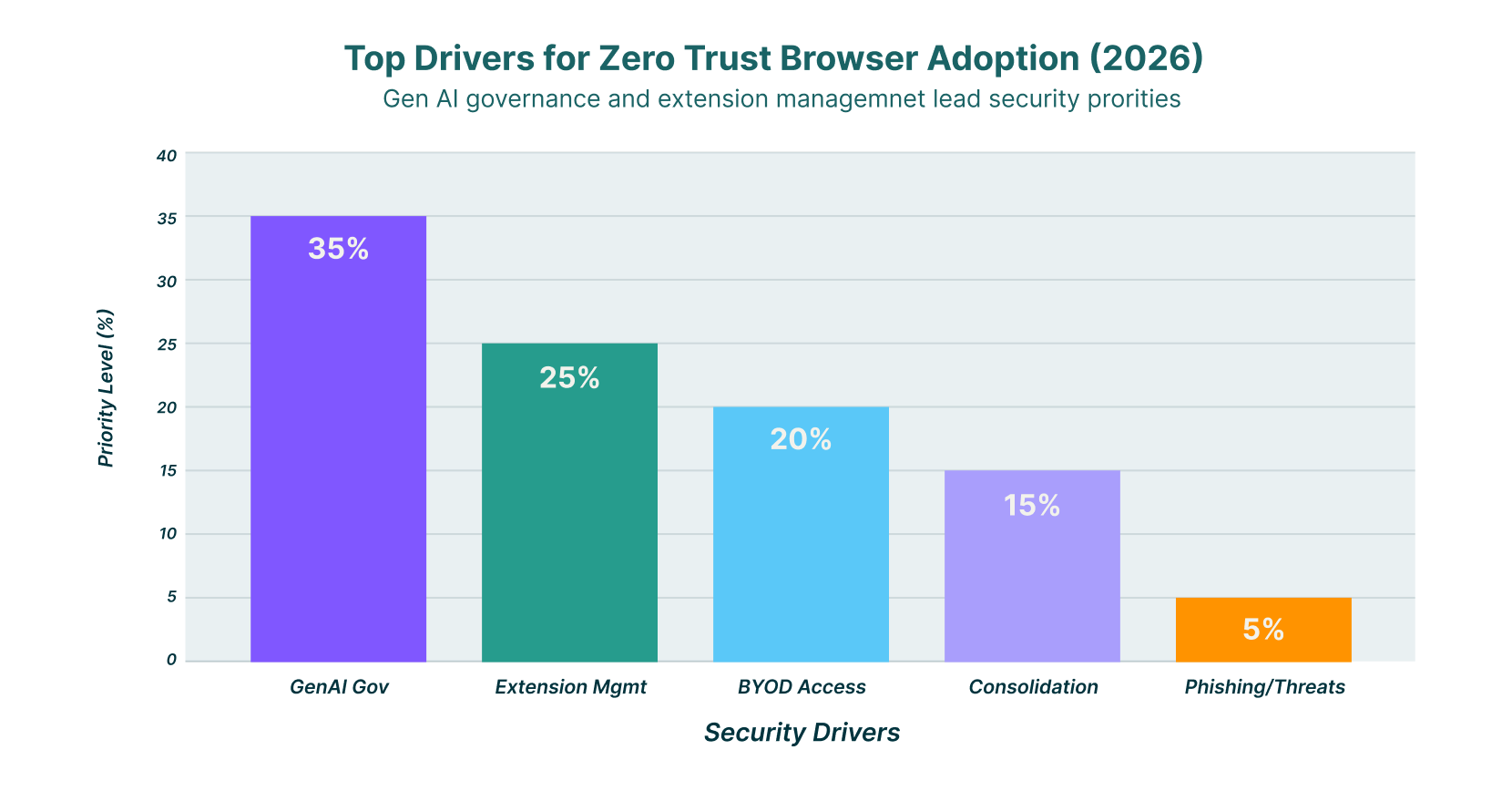
A significant shift towards platform consolidation is reshaping the market, with major players acquiring niche browser security firms to offer unified endpoint and identity protection suites. This trend drives the convergence of browser security with broader Security Service Edge (SSE) and XDR platforms, reducing agent fatigue for IT teams. Organizations now seek single-agent architectures that combine browsing protection, data loss prevention (DLP), and identity verification, moving away from disjointed point solutions that complicate management.
Managing the risk of malicious browser extensions has become a top priority as attackers exploit them to bypass standard defenses. In 2026, superior browser security tools are distinguished by their ability to provide deep visibility into extension behavior and permissions. Automated risk scoring and policy-based enforcement allow security teams to instantly disable or restrict high-risk extensions across the entire fleet, neutralizing a growing vector for credential theft and data espionage.
11 Top Zero Trust Browser Security Tools for 2026
The following list features the top vendors delivering robust zero-trust browser security, from lightweight extensions to full enterprise browsers.
| Solution | Key Capabilities | Best for |
| LayerX | Extension-based, unmanaged device support, deep visibility | Unmanaged devices & Shadow IT visibility |
| Island | Enterprise browser, strict data controls | Strict data control on managed devices |
| Palo Alto Networks (Prisma) | SASE integration, enterprise browser | SASE integration |
| Surf Security | Zero-trust access, end-to-end encryption | Zero infrastructure costs |
| Mammoth Cyber | Enterprise AI browser, remote access | Remote access & GenAI security |
| Seraphic Security | Exploit prevention, session security | Exploit prevention & session security |
| SquareX | Browser-native file & threat protection | Malicious file protection |
| Conceal | Browser-native SSE, isolation | Ransomware & credential theft protection |
| Menlo Security | Remote Browser Isolation (RBI) | Threat isolation |
| Ermes | AI-powered behavioral analysis | Phishing & zero-day protection |
| Red Access | Agentless browsing security | Hybrid workforce security |
1. LayerX

LayerX delivers a user-first browser security platform via a lightweight extension that transforms any commercial browser into a secure, managed workspace. The solution provides deep visibility into all browsing activity, enabling real-time protection against web-borne threats, data leakage, and malicious extensions without the need for a proprietary browser. It is particularly effective for securing unmanaged devices and third-party contractors, as it can be deployed rapidly to enforce zero-trust policies without disrupting the user experience.
The platform excels in mitigating risks from Shadow SaaS and GenAI usage by monitoring user interactions at the granular event level. LayerX analyzes browser events to prevent sensitive data from being uploaded to unauthorized applications or shared with AI tools, offering a comprehensive data protection layer that complements existing security stacks. Its approach empowers security teams to maintain full control over the browser attack surface while preserving the flexibility employees need to remain productive.
2. Island

Island provides a dedicated enterprise browser built on the Chromium engine, designed to give organizations complete control over the “last mile” of user interaction with web applications. By replacing the standard consumer browser with a managed version, Island allows IT teams to govern every aspect of the browsing experience, including copy-paste actions, screenshots, and data downloads. This architecture creates a secure environment where sensitive corporate data is isolated from the underlying device and personal applications.
The solution is well-suited for environments requiring strict compliance and data governance, such as financial services or healthcare. Island integrates natively with identity providers and security tools to enforce zero-trust access policies, ensuring that users can only access authorized resources based on their identity and device posture. Its built-in productivity features help minimize friction while maintaining a high security standard for managed devices.
3. Palo Alto Networks (Prisma Access Browser)

Palo Alto Networks offers the Prisma Access Browser as a key component of its SASE platform, extending secure access principles directly to the web interface. This enterprise browser is designed to work in tandem with Prisma Access, providing a unified security posture that covers both network traffic and browser-based activity. It enables organizations to enforce consistent security policies across all users and devices, leveraging Palo Alto’s extensive threat intelligence to block attacks in real time.
The browser provides deep visibility into user actions, allowing for precise control over data sharing and SaaS application usage. Features like “Typing Guard” help prevent sensitive data from being entered into unauthorized GenAI tools, while its seamless integration with the SASE fabric ensures that security remains continuous without degrading performance. This makes it an ideal choice for current Palo Alto Networks customers looking to consolidate their security infrastructure.
4. Surf Security

Surf Security offers a zero-trust enterprise browser that focuses on providing secure access to corporate applications without the need for complex infrastructure or agents. The solution emphasizes a “zero infrastructure” approach, running entirely on the endpoint to encrypt and isolate web traffic from potential threats on the device. This design allows organizations to secure remote workers and contractors effectively, as it does not rely on VDI or VPNs to establish a secure connection.
The platform includes strong identity-first controls, ensuring that access to SaaS and on-premise applications is granted only to verified users. Surf Security’s browser creates a distinct boundary between personal and corporate data, preventing data leakage through features like encryption of local files and restrictions on data transfer actions. Its ability to run alongside standard browsers makes it a flexible option for diverse workforce needs.
5. Mammoth Cyber

Mammoth Cyber provides an Enterprise AI Browser that combines secure remote access with specialized controls for Generative AI and SaaS applications. The platform is designed to replace traditional VDI solutions by offering a lightweight, browser-based workspace that secures access for contractors and BYOD users. It focuses on visibility and control, allowing administrators to audit extension usage and prevent confidential data exposure through granular policy enforcement.
A key differentiator for Mammoth Cyber is its emphasis on GenAI governance, providing tools to detect and regulate the use of AI assistants within the enterprise. The solution ensures that sensitive data is not inadvertently shared with public AI models by monitoring user inputs and enforcing context-aware blocking rules. This makes it a strong candidate for organizations prioritizing both secure remote access and the safe adoption of AI technologies.
6. Seraphic Security

Seraphic Security, which was acquired by CrowdStrike in early 2026, offers a unique approach to browser security by injecting a lightweight security layer into any commercial browser. This technology focuses on preventing exploitation and session hijacking by randomizing browser memory and internal structures, making it difficult for attackers to execute successful exploits. Seraphic provides robust protection against zero-day threats and sophisticated phishing attacks without requiring users to switch to a proprietary browser.
The platform’s integration with CrowdStrike’s Falcon ecosystem allows for enhanced correlation of threat signals from the endpoint to the browser. It delivers detailed telemetry on user behavior and web application interactions, enabling security teams to enforce dynamic access policies based on real-time risk assessments. Seraphic is particularly effective for organizations seeking advanced threat prevention capabilities that work across all major browsers.
7. SquareX

SquareX positions itself as a browser-native security solution that empowers users to be the first line of defense against web threats. Delivered as a browser extension, it focuses on neutralizing malicious files and isolating risky websites in disposable cloud containers. This approach allows users to view documents and browse suspicious links safely without exposing their local device or network to potential malware.
The solution is designed to be unobtrusive while providing powerful protection against file-based attacks and social engineering. SquareX enables security teams to enforce policies that restrict the downloading of dangerous file types and block access to known malicious domains. Its emphasis on user-centric security makes it a suitable option for organizations looking to enhance their defense-in-depth strategy without implementing heavy infrastructure.
8. Conceal

Conceal offers a browser-native Security Service Edge (SSE) platform that uses isolation technology to protect users from ransomware, credential theft, and other web-based attacks. The solution’s “ConcealBrowse” extension acts as an intelligent decision engine, analyzing every URL click to determine if it should be routed through a secure, isolated cloud container or allowed to proceed normally. This dynamic isolation ensures that risky content never executes on the user’s endpoint.
The platform protects credential harvesting by detecting phishing sites in real time and preventing users from entering their passwords into unauthorized forms. Conceal’s lightweight architecture allows for easy deployment across managed and unmanaged devices, providing a seamless security layer that adapts to the user’s workflow. It is an effective tool for organizations seeking to minimize their attack surface against targeted phishing campaigns.
9. Menlo Security

Menlo Security is a pioneer in Remote Browser Isolation (RBI) technology, offering a platform that executes all web content in a secure cloud environment before streaming a safe version to the user’s device. This “prevention-first” approach eliminates the risk of malware reaching the endpoint, as no active code is ever executed locally. Menlo’s solution is widely used for protecting high-risk users and isolating traffic from uncategorized or suspicious websites.
The company has expanded its capabilities with “HEAT Shield,” a feature designed to detect and block Highly Evasive Adaptive Threats that bypass traditional detection mechanisms. Menlo Security provides granular data controls and threat intelligence integration, allowing administrators to enforce policies based on user identity and web category. It remains a top choice for enterprises that require the highest level of isolation and threat prevention.
10. Ermes

Ermes Cyber Security delivers a browser security platform powered by artificial intelligence and deep learning to detect and block web threats in real time. Unlike traditional reputation-based systems, Ermes analyzes the behavior of websites and browser connections to identify zero-day phishing attacks and malicious tracking attempts. The solution operates as a browser extension, providing on-device protection that reduces the window of exposure to new threats.
The platform offers a comprehensive set of modules, including protection against malvertising, credential theft, and data leakage. Ermes focuses on identifying “shadow” web activities and blocking unauthorized data transfers, making it a valuable tool for maintaining visibility over the browsing environment. Its AI-driven approach ensures that protection remains effective even against rapidly evolving attack techniques.
11. Red Access

Red Access provides an agentless browsing security platform designed to secure hybrid workforces without requiring the installation of extensions or agents on the endpoint. The solution works by acting as a smart proxy that inspects and secures web traffic for any browser, offering a true “bring your own browser” experience. This architecture allows organizations to extend enterprise-grade security to unmanaged devices and third-party contractors with minimal friction.
The platform combines static and dynamic inspection techniques to protect against a wide range of web risks, including phishing, malware, and data exfiltration. Red Access enables security teams to enforce granular access policies and gain visibility into browsing activities across all web applications. Its ease of deployment and broad compatibility make it an attractive option for companies with diverse and distributed user bases.
How to Choose the Best Zero Trust Browser Security Provider
- Evaluate the deployment method to ensure it aligns with your need for a full enterprise browser versus a lightweight extension that supports multiple browsers.
- Assess the solution’s ability to secure unmanaged devices and BYOD users without requiring complex MDM profiles or intrusive agents.
- Verify that the tool offers granular visibility and control over browser extensions to mitigate risks from malicious or privacy-invasive add-ons.
- Check for robust data loss prevention capabilities that can block sensitive data transfers, including copy-paste actions and file uploads to GenAI tools.
- Ensure the provider integrates seamlessly with your existing identity providers and security ecosystem to enforce consistent zero-trust access policies.
FAQs
What is zero-trust browser security?
Zero trust browser security is an approach that treats the web browser as an untrusted environment, verifying every user, device, and application interaction before granting access. It continuously monitors browsing sessions to prevent data leakage and block threats, ensuring that security controls are applied at the exact point of user activity rather than just at the network perimeter.
How does zero-trust browser security differ from a VPN?
A VPN secures the network connection by creating an encrypted tunnel, but it generally grants broad access to the network once the user is authenticated. In contrast, zero-trust browser security focuses on the application layer, inspecting the actual content and context of the browsing session. It enforces granular policies for each web application and user action, providing much finer control and visibility than a simple network tunnel.
Can zero-trust browser security replace VDI?
Yes, for many use cases, zero-trust browser security can replace Virtual Desktop Infrastructure (VDI). By securing the browser directly, these solutions allow users to access corporate applications safely from any device without the high cost, latency, and complexity associated with maintaining full virtual desktop environments. This often results in a better user experience and lower operational overhead.
What features should I look for in a zero-trust browser solution?
Key features to look for include deep visibility into web traffic, granular data loss prevention (DLP) controls, and the ability to manage browser extensions. You should also prioritize solutions that offer protection against phishing and malware, integration with identity providers for access control, and support for both managed and unmanaged devices to cover your entire workforce.
Is an enterprise browser necessary for zero-trust security?
An enterprise browser is one way to achieve zero trust security, but it is not the only method. Browser extensions and agentless solutions can also provide robust zero-trust capabilities by layering security on top of standard commercial browsers like Chrome and Edge. The choice depends on your organization’s specific requirements for control, user experience, and device management strategies.